Broadcast Quality Camera Hire in Melbourne for Operators and Gear

A broadcast-ready image depends on more than the camera body. Planning broadcast quality camera hire in Melbourne means matching the operator and camera setup to the production, then aligning image quality and connectivity with the rest of the event system.

A polished picture depends on the camera setup, production workflow and signal path working together. The right approach depends on where you’re filming, how the footage will be used and how it needs to connect with the event’s other technical elements.

This guide explains how camera operators and broadcast videography fit into a Melbourne production, what image quality and connectivity considerations can shape your setup, and how technical direction and event AV can support a seamless result. You’ll have a clearer view of the decisions that matter before production day, so creative intent and technical delivery stay in step.

Key Takeaways

  • Match the camera operator and equipment setup to the production format, location and intended use of the footage.
  • Plan broadcast videography around shot requirements, camera positions and how footage will be delivered to its audience.
  • Assess image quality and connectivity together so the camera signal suits the production’s display and workflow needs.
  • Clarify which lenses, batteries, media and accessories are part of a camera package before building the technical plan.

Camera operators and equipment hire

Camera coverage begins with the intended audience experience, recording format and production schedule. NextGen AV coordinates camera operators, equipment and on-set technical support so each element contributes to the footage and event outcome you need.

We confirm the production scope, equipment requirements and crew responsibilities before filming, then build them into the production plan. This keeps camera setup and operation aligned with your event, without leaving you to manage equipment checks and handovers.

Our team coordinates the production schedule with venue access, setup and pack-down, and other event requirements. With camera coverage planned alongside the wider production, your crew can focus on delivering the event.

Included Lenses, Batteries and Accessories

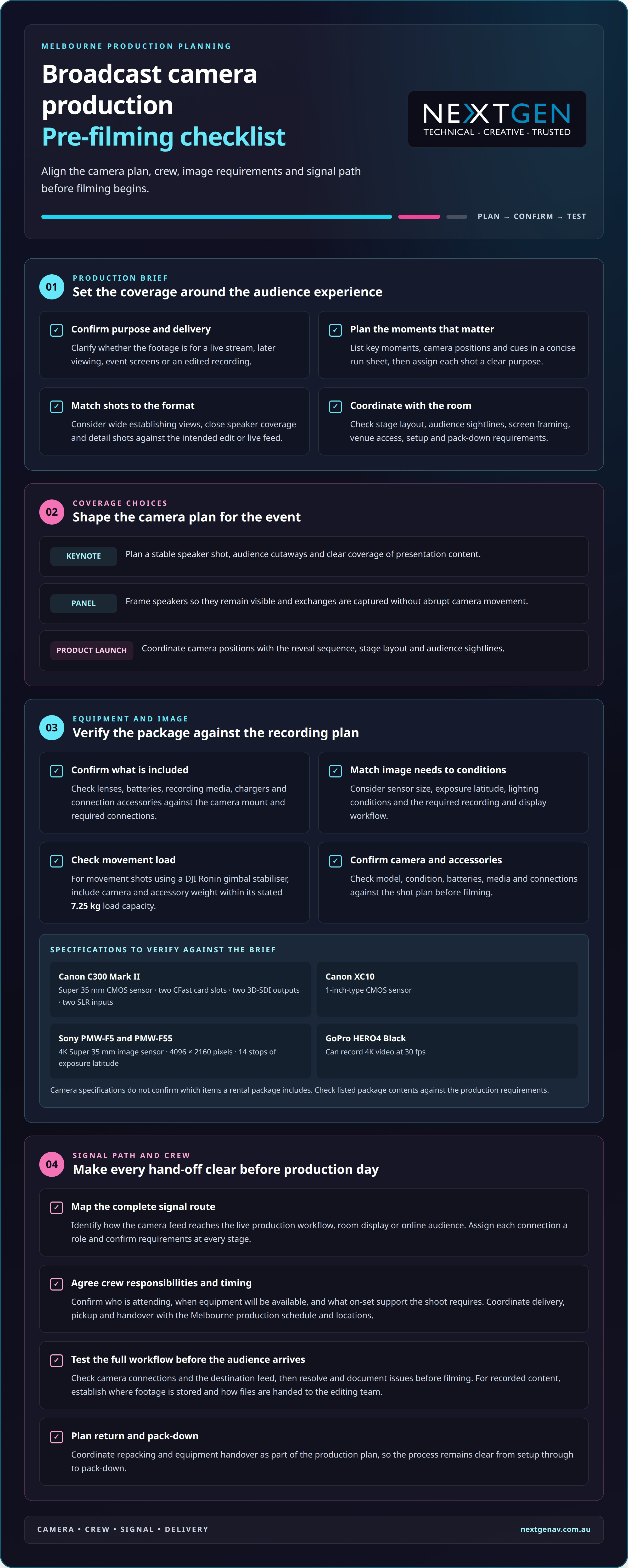
We plan lenses, batteries, recording media, chargers and connection accessories around your recording requirements. A Canon C300 Mark II, for example, has two CFast card slots, but that fact doesn’t establish which media a rental package includes. We confirm listed items against your recording plan, camera mount and required connections. For movement shots, the DJI Ronin gimbal stabiliser has a load capacity of 7.25 kg, so camera and accessory weight matters when matching equipment.

NextGen AV coordinates equipment with production and crew responsibilities in the event plan. This gives the team a clear approach to power, camera positions and connections, with requirements confirmed before the event.

Delivery, Pickup and On-Set Support

NextGen AV coordinates delivery, pickup and on-set technical support with your production schedule and locations in Melbourne. We confirm who is attending, when equipment will be available and what support the shoot requires, so camera operators and technicians are accounted for alongside the equipment.

Before filming, our team checks the camera model, accessories, condition, batteries, media and connections against your shot plan. We resolve and document any issues before the shoot, then coordinate repacking and handover at return. With equipment and technical support managed as part of production, you can rely on a clear process from setup through to pack-down.

Broadcast camera videography

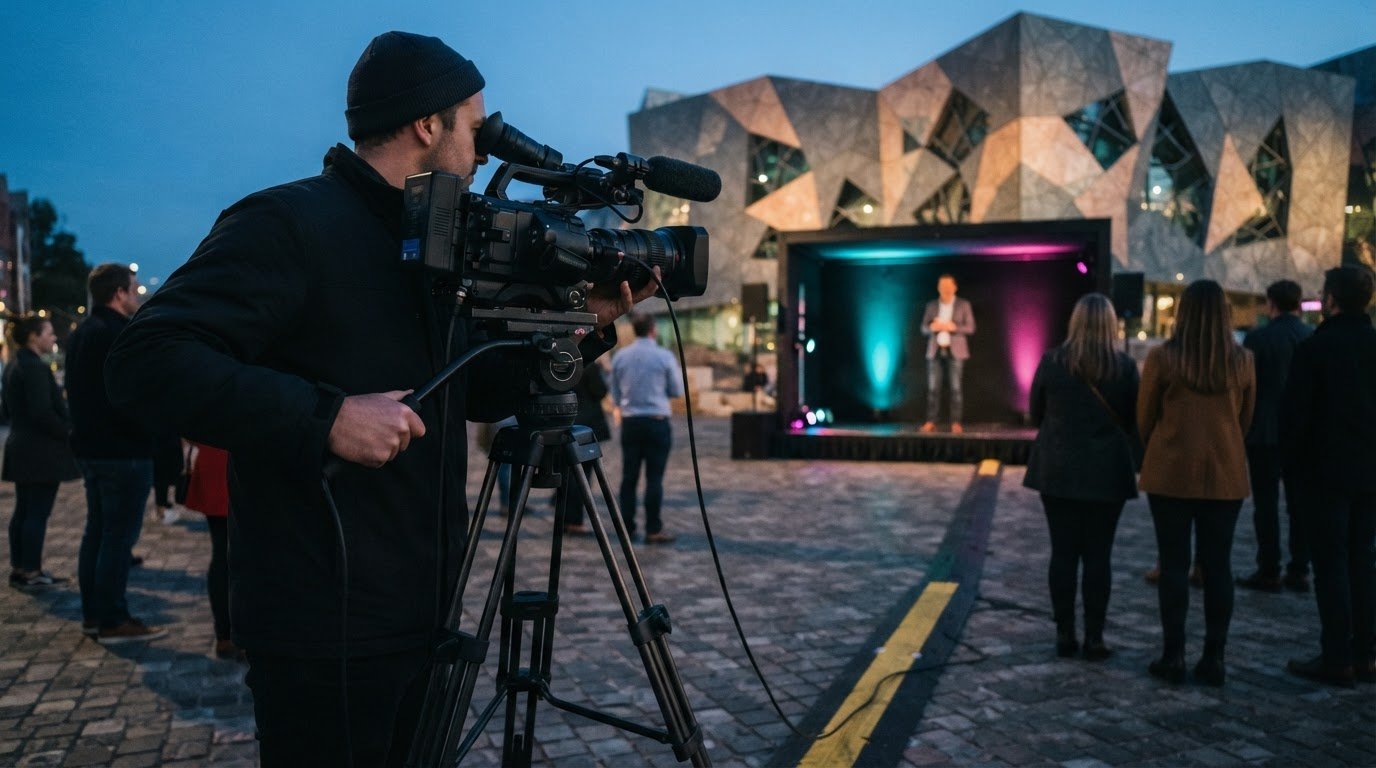
Camera production turns live moments into footage viewers can follow during a stream or watch later. A conference keynote needs different coverage from a product launch, where reveal timing and audience reactions shape the sequence. Agree on camera positions, key moments and delivery format before filming.

For a keynote, plan a stable speaker shot, audience cutaways and clear coverage of presentation content. A panel discussion calls for considered framing that keeps each speaker visible and captures exchanges without abrupt camera movement. During a product launch, coordinate the camera position with the reveal sequence, stage layout and audience sightlines. These decisions help the footage feel intentional rather than assembled from disconnected moments.

Recording capability is only one part of the production plan. The GoPro HERO4 Black can record 4K video at 30 fps, which provides one example of a camera’s stated recording format. The production still needs a shot plan that suits the camera position and intended edit. Consider whether the crew needs wide establishing views, close speaker coverage or detail shots, then assign each shot a clear purpose.

For a live stream, plan how the camera signal reaches the production workflow and how camera changes will be managed. For recorded content, establish where footage is stored and how files are handed to the editing team. Keep camera movements deliberate, maintain consistent framing and allow transitions between speakers or program segments. A concise run sheet can identify cues, camera positions and the moments that need priority coverage.

At an event, screen framing and camera sightlines should work together. Plan how the live image will appear on event LED video walls, so the audience can follow the speaker or visual content from across the room. A clear signal handoff and coordinated camera cues help keep the on-stage moment and displayed image aligned.
Broadcast Quality Camera Hire in Melbourne for Operators and Gear

Camera image quality and connectivity

Image quality depends on more than resolution. Sensor size, exposure latitude and the lighting conditions shape the recorded picture. The Canon C300 Mark II features a Super 35 mm CMOS sensor, while the Canon XC10 has a 1-inch-type CMOS sensor. These named specifications help distinguish camera formats, but the right choice still depends on the production and intended delivery.

The Sony PMW-F5 and PMW-F55 have a 4K Super 35 mm image sensor with 4096 x 2160 pixels. Both offer 14 stops of exposure latitude. That range gives production teams a technical basis for considering scenes with varied brightness, such as a presenter beneath stage lighting. The camera must still be matched to the required recording and display workflow.

Connectivity matters when footage feeds a live production system. The Canon C300 Mark II has two 3D-SDI outputs and two SLR inputs. Map each connection to its role, such as sending a camera signal onward or bringing a separate signal into the camera setup. A clear signal path helps the crew coordinate camera output with the wider production chain.

Before filming, map how the camera feed reaches its destination and confirm the connections required at each stage of the production workflow. For a conference, this planning helps coordinate camera coverage with the room’s display system. Aligning the feed with its destination supports a consistent viewing experience for people in the room and online.

Camera framing and delivery should suit the footage’s intended use. A recorded interview, live stream and event-screen feed can each require a different setup. Plan camera positions and the output path around the production brief, then test the complete workflow before the audience arrives. This gives the crew time to resolve connection issues and prepare a clear picture for the event.

A production plan can record the Canon C300 Mark II’s connection count as 2x for the 3D-SDI outputs and 2x for the SLR inputs. Assign each connection a destination or role before setup, and check that the chosen routing matches the intended camera workflow. Keeping this information with the signal plan can make handoffs among crew members clearer.

What is included with a broadcast camera rental, such as lenses, batteries, media, and accessories?

For a Melbourne conference, NextGen AV plans camera production as part of the event, coordinating operators, setup, recording and pack-down alongside your AV requirements. We align camera coverage with the run sheet and crew responsibilities, so production teams work to a shared plan and handovers run smoothly.

We map camera positions for presenter, panel and audience coverage, then coordinate the equipment and crew assigned to each shot. This keeps camera operation aligned with the programme and helps capture the moments that matter without disrupting the event.

We also plan how recording files will be handled after filming. We agree who will transfer and name the footage, then coordinate its handover to your editor or production lead. For a product launch, this process helps the post-production team locate the reveal sequence and required shots without relying on informal notes.

  • Camera production: Plan coverage, setup, operation and pack-down around the event schedule.
  • Crew coordination: Assign camera roles and responsibilities in the run sheet.
  • Footage handover: Agree how recordings will be transferred, named and delivered to the post-production team.

Before production begins, we align the event brief, camera coverage and filming responsibilities. Your named point of contact coordinates schedule changes and keeps the crew working from the same plan. From setup through to footage handover, we manage the details so your camera and post-production teams can focus on delivering a seamless event experience.

NextGen AV

NextGen AV helps you plan the wider event environment around your camera production. When footage needs to reach an audience in the room, consider how displays, sound, lighting and staging support the experience. LED Video Walls can present live visuals, while Professional Audio Systems support clear sound across the event space. Lighting Design and Equipment and Staging and Rigging help shape the setting for speakers, presentations and filmed moments.

Include these requirements in the production plan early, especially when camera positions, screens and stage activity need to work together. Coordinating these elements helps align technical decisions with the audience experience instead of treating each as a separate task.

Contact NextGen AV to discuss the event setup that fits your production.

Set Your Production in Motion

Before production begins, decide what viewers should take away. An executive address, product reveal or audience response each calls for a different editorial emphasis. For broadcast-quality camera hire in Melbourne, setting that creative intention early gives the production a clear point of view and helps shape camera coverage around the moments that matter.

NextGen AV can help shape the technical direction around the experience you want to create. Share your event brief and creative priorities to develop a production approach that gives each key moment room to land.

Contact NextGen AV about camera hire to start planning your production. A clear creative direction is a strong first step towards footage that carries the occasion beyond the room.

Frequently Asked Questions

Where can I hire broadcast-quality cameras in Melbourne?

NextGen AV is a Melbourne-based option for broadcast-quality camera hire and video production. Its Video & Cameras services include multi-camera production, presentation switching, recording and playback, with camera operators available as required. For a conference or product launch, share the event format and intended audience, then align camera coverage with the wider technical plan. This connects filming with the live event experience.

How does NextGen AV guide clients through camera production booking requirements in Melbourne?

NextGen AV works with you to clarify the production scope, technical responsibilities and any applicable booking requirements before confirming arrangements. The team incorporates these details into the production plan, coordinating camera support with your wider event needs so you can focus on delivering a seamless audience experience.

A broadcast-ready image depends on more than the camera body. Planning broadcast quality camera hire in Melbourne means matching the operator and camera setup to the production, then aligning image quality and connectivity with the rest of the event system.

A polished picture depends on the camera setup, production workflow and signal path working together. The right approach depends on where you’re filming, how the footage will be used and how it needs to connect with the event’s other technical elements.

This guide explains how camera operators and broadcast videography fit into a Melbourne production, what image quality and connectivity considerations can shape your setup, and how technical direction and event AV can support a seamless result. You’ll have a clearer view of the decisions that matter before production day, so creative intent and technical delivery stay in step.

Key Takeaways

  • Match the camera operator and equipment setup to the production format, location and intended use of the footage.
  • Plan broadcast videography around shot requirements, camera positions and how footage will be delivered to its audience.
  • Assess image quality and connectivity together so the camera signal suits the production’s display and workflow needs.
  • Clarify which lenses, batteries, media and accessories are part of a camera package before building the technical plan.

Camera operators and equipment hire

Camera coverage begins with the intended audience experience, recording format and production schedule. NextGen AV coordinates camera operators, equipment and on-set technical support so each element contributes to the footage and event outcome you need.

We confirm the production scope, equipment requirements and crew responsibilities before filming, then build them into the production plan. This keeps camera setup and operation aligned with your event, without leaving you to manage equipment checks and handovers.

Our team coordinates the production schedule with venue access, setup and pack-down, and other event requirements. With camera coverage planned alongside the wider production, your crew can focus on delivering the event.

Included Lenses, Batteries and Accessories

We plan lenses, batteries, recording media, chargers and connection accessories around your recording requirements. A Canon C300 Mark II, for example, has two CFast card slots, but that fact doesn’t establish which media a rental package includes. We confirm listed items against your recording plan, camera mount and required connections. For movement shots, the DJI Ronin gimbal stabiliser has a load capacity of 7.25 kg, so camera and accessory weight matters when matching equipment.

NextGen AV coordinates equipment with production and crew responsibilities in the event plan. This gives the team a clear approach to power, camera positions and connections, with requirements confirmed before the event.

Delivery, Pickup and On-Set Support

NextGen AV coordinates delivery, pickup and on-set technical support with your production schedule and locations in Melbourne. We confirm who is attending, when equipment will be available and what support the shoot requires, so camera operators and technicians are accounted for alongside the equipment.

Before filming, our team checks the camera model, accessories, condition, batteries, media and connections against your shot plan. We resolve and document any issues before the shoot, then coordinate repacking and handover at return. With equipment and technical support managed as part of production, you can rely on a clear process from setup through to pack-down.

Broadcast camera videography

Camera production turns live moments into footage viewers can follow during a stream or watch later. A conference keynote needs different coverage from a product launch, where reveal timing and audience reactions shape the sequence. Agree on camera positions, key moments and delivery format before filming.

For a keynote, plan a stable speaker shot, audience cutaways and clear coverage of presentation content. A panel discussion calls for considered framing that keeps each speaker visible and captures exchanges without abrupt camera movement. During a product launch, coordinate the camera position with the reveal sequence, stage layout and audience sightlines. These decisions help the footage feel intentional rather than assembled from disconnected moments.

Recording capability is only one part of the production plan. The GoPro HERO4 Black can record 4K video at 30 fps, which provides one example of a camera’s stated recording format. The production still needs a shot plan that suits the camera position and intended edit. Consider whether the crew needs wide establishing views, close speaker coverage or detail shots, then assign each shot a clear purpose.

For a live stream, plan how the camera signal reaches the production workflow and how camera changes will be managed. For recorded content, establish where footage is stored and how files are handed to the editing team. Keep camera movements deliberate, maintain consistent framing and allow transitions between speakers or program segments. A concise run sheet can identify cues, camera positions and the moments that need priority coverage.

At an event, screen framing and camera sightlines should work together. Plan how the live image will appear on event LED video walls, so the audience can follow the speaker or visual content from across the room. A clear signal handoff and coordinated camera cues help keep the on-stage moment and displayed image aligned.

Camera image quality and connectivity

Image quality depends on more than resolution. Sensor size, exposure latitude and the lighting conditions shape the recorded picture. The Canon C300 Mark II features a Super 35 mm CMOS sensor, while the Canon XC10 has a 1-inch-type CMOS sensor. These named specifications help distinguish camera formats, but the right choice still depends on the production and intended delivery.

The Sony PMW-F5 and PMW-F55 have a 4K Super 35 mm image sensor with 4096 x 2160 pixels. Both offer 14 stops of exposure latitude. That range gives production teams a technical basis for considering scenes with varied brightness, such as a presenter beneath stage lighting. The camera must still be matched to the required recording and display workflow.

Connectivity matters when footage feeds a live production system. The Canon C300 Mark II has two 3D-SDI outputs and two SLR inputs. Map each connection to its role, such as sending a camera signal onward or bringing a separate signal into the camera setup. A clear signal path helps the crew coordinate camera output with the wider production chain.

Before filming, map how the camera feed reaches its destination and confirm the connections required at each stage of the production workflow. For a conference, this planning helps coordinate camera coverage with the room’s display system. Aligning the feed with its destination supports a consistent viewing experience for people in the room and online.

Camera framing and delivery should suit the footage’s intended use. A recorded interview, live stream and event-screen feed can each require a different setup. Plan camera positions and the output path around the production brief, then test the complete workflow before the audience arrives. This gives the crew time to resolve connection issues and prepare a clear picture for the event.

A production plan can record the Canon C300 Mark II’s connection count as 2x for the 3D-SDI outputs and 2x for the SLR inputs. Assign each connection a destination or role before setup, and check that the chosen routing matches the intended camera workflow. Keeping this information with the signal plan can make handoffs among crew members clearer.

What is included with a broadcast camera rental, such as lenses, batteries, media, and accessories?

For a Melbourne conference, NextGen AV plans camera production as part of the event, coordinating operators, setup, recording and pack-down alongside your AV requirements. We align camera coverage with the run sheet and crew responsibilities, so production teams work to a shared plan and handovers run smoothly.

We map camera positions for presenter, panel and audience coverage, then coordinate the equipment and crew assigned to each shot. This keeps camera operation aligned with the programme and helps capture the moments that matter without disrupting the event.

We also plan how recording files will be handled after filming. We agree who will transfer and name the footage, then coordinate its handover to your editor or production lead. For a product launch, this process helps the post-production team locate the reveal sequence and required shots without relying on informal notes.

  • Camera production: Plan coverage, setup, operation and pack-down around the event schedule.
  • Crew coordination: Assign camera roles and responsibilities in the run sheet.
  • Footage handover: Agree how recordings will be transferred, named and delivered to the post-production team.

Before production begins, we align the event brief, camera coverage and filming responsibilities. Your named point of contact coordinates schedule changes and keeps the crew working from the same plan. From setup through to footage handover, we manage the details so your camera and post-production teams can focus on delivering a seamless event experience.

NextGen AV

NextGen AV helps you plan the wider event environment around your camera production. When footage needs to reach an audience in the room, consider how displays, sound, lighting and staging support the experience. LED Video Walls can present live visuals, while Professional Audio Systems support clear sound across the event space. Lighting Design and Equipment and Staging and Rigging help shape the setting for speakers, presentations and filmed moments.

Include these requirements in the production plan early, especially when camera positions, screens and stage activity need to work together. Coordinating these elements helps align technical decisions with the audience experience instead of treating each as a separate task.

Contact NextGen AV to discuss the event setup that fits your production.

Set Your Production in Motion

Before production begins, decide what viewers should take away. An executive address, product reveal or audience response each calls for a different editorial emphasis. For broadcast-quality camera hire in Melbourne, setting that creative intention early gives the production a clear point of view and helps shape camera coverage around the moments that matter.

NextGen AV can help shape the technical direction around the experience you want to create. Share your event brief and creative priorities to develop a production approach that gives each key moment room to land.

Contact NextGen AV about camera hire to start planning your production. A clear creative direction is a strong first step towards footage that carries the occasion beyond the room.

Frequently Asked Questions

Where can I hire broadcast-quality cameras in Melbourne?

NextGen AV is a Melbourne-based option for broadcast-quality camera hire and video production. Its Video & Cameras services include multi-camera production, presentation switching, recording and playback, with camera operators available as required. For a conference or product launch, share the event format and intended audience, then align camera coverage with the wider technical plan. This connects filming with the live event experience.

How does NextGen AV guide clients through camera production booking requirements in Melbourne?

NextGen AV works with you to clarify the production scope, technical responsibilities and any applicable booking requirements before confirming arrangements. The team incorporates these details into the production plan, coordinating camera support with your wider event needs so you can focus on delivering a seamless audience experience.

Back to Articles

Discover Valuable Insights

Unlock Expert Tips and Advice

Our blog is packed with valuable information to help you stay ahead. Whether you’re looking for expert advice, industry trends, or practical tips, you’ll find everything you need. Reach out today to learn more or get in touch with us for personalised support!

Contact Us

Request A Quote

Make an
Enquiry

Let’s Get Your Event Sorted

Complete the enquiry form with your event date, venue, audience size, event type and budget. Our Melbourne AV team will review your requirements and recommend the right PA, screen, lighting, staging or production setup for your event.

What happens next?


1.We review your event details
Tell us your date, venue, audience size and event type.

2.We recommend the right setup
From PA hire to screens, lighting, staging and full AV production.

3. We come back with clear advice
You’ll receive practical recommendations and a fast quote from our Melbourne team.

Need help urgently?
Call 1300 792 922.

Resource Download

Tell us a bit about yourself to download our resources.

7