Event health and safety AV requirements begin with a clear emergency plan, a site walk-through and documented checks of electrical equipment, structures, access routes and supplier risks. Map exits and safety zones, define staff communication procedures and make emergency instructions easy to find. These steps turn potential hazards into practical controls before the event opens.
It’s easy to focus on the stage, screens and sound, but a safe event depends on how every part of the site works together. Planning for emergencies and reviewing supplier documents early give your team a clearer picture of risks during bump-in, the event and bump-out.
This guide explains how to prepare an emergency plan, review AV risk assessments and method statements, and manage hazards involving temporary structures, power, fire and weather. Use it as a practical framework for coordinating technical details and keeping the event running safely.
Key Takeaways
- Plan electrical safety around tested equipment, secure leads and suitable residual current devices.
- Make emergency procedures clear, map exits and safety zones, and consider how the public will receive announcements.
- Use supplier risk assessments and method statements to clarify hazards, controls and responsibilities before work begins.
- Assess structures, fire, power and weather together so site conditions inform safe setup and operation.
1. Why should you hire an AV company to ensure your audio-visual equipment is health and safety compliant?
Electrical faults can disrupt a production and put crew or attendees at risk. Before setup, inspect power leads, plugs, connectors and equipment casings for damage. Remove faulty items from use and arrange appropriate testing and tagging. Plan residual current device protection for the electrical setup, and keep distribution points accessible to authorised crew. These checks help address hazards before equipment reaches the stage.
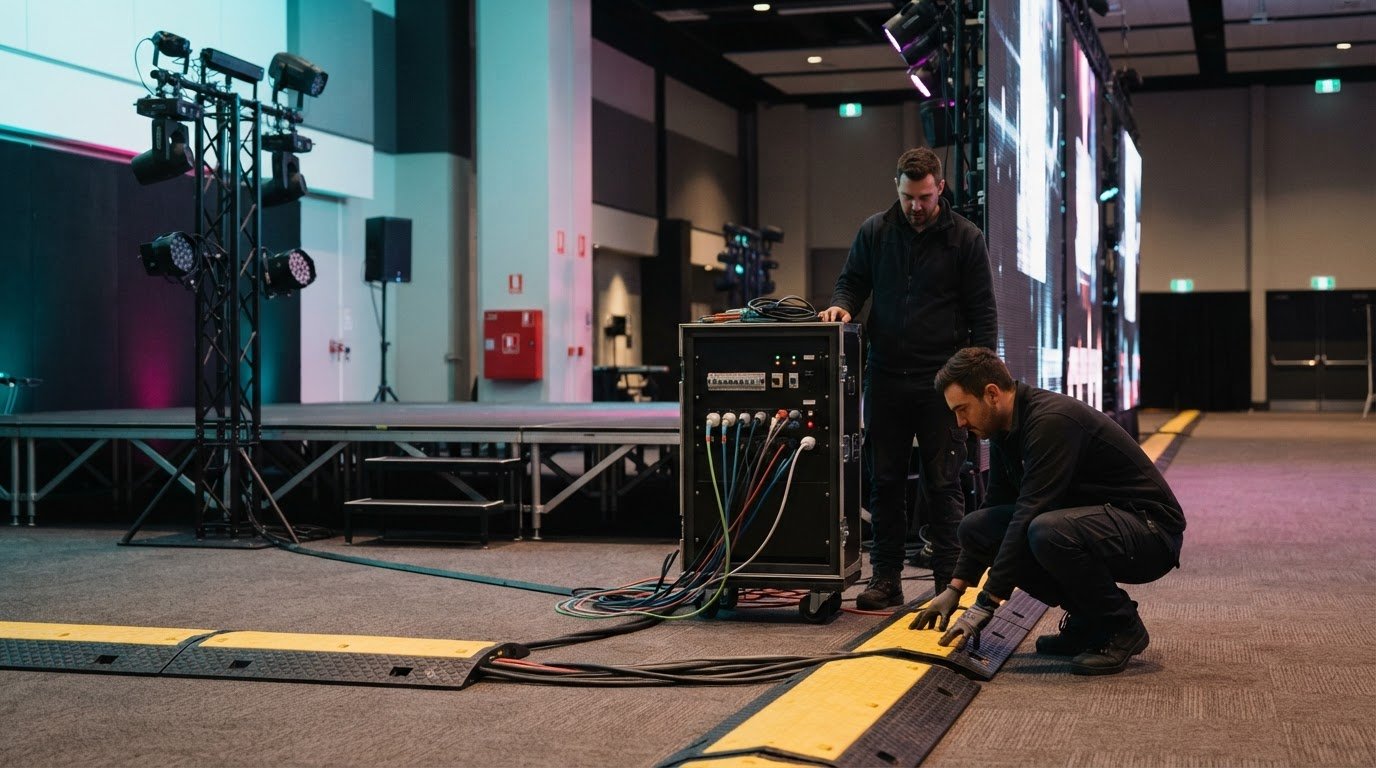
During a Melbourne site walk-through, trace each cable route from its power source to the equipment. Secure crossings and keep leads clear of entrances, walkways, toilets and emergency exits to reduce trip hazards. Recheck routes after furniture or staging moves, as a previously clear path can become obstructed during bump-in.
The qualifications AV technicians need depend on their duties. For high-risk rigging, use a qualified rigger with a High-Risk Work Licence. Confirm who directs each task and ensure the crew follows the structure’s documented load limits. Heavy speakers, screens and lighting fixtures require controlled lifting and secure placement, not improvised handling.
Manual-handling risks increase during bump-in and bump-out, when cases and equipment move through busy access routes. Plan the route, identify pinch points and coordinate lifts before equipment leaves its case. A clear sequence reduces congestion around crew and audience areas. Event lighting can also illuminate walkways, exits and hazards, helping people move safely through the venue.
Before doors open, inspect the installed AV system again. Check that equipment is stable, leads are secured and access routes are clear. Test lighting and sound during the same walk-through, then record faults and corrective actions. These checks support a controlled technical setup and help protect the audience experience.
2. How To Write An Event Emergency Plan?
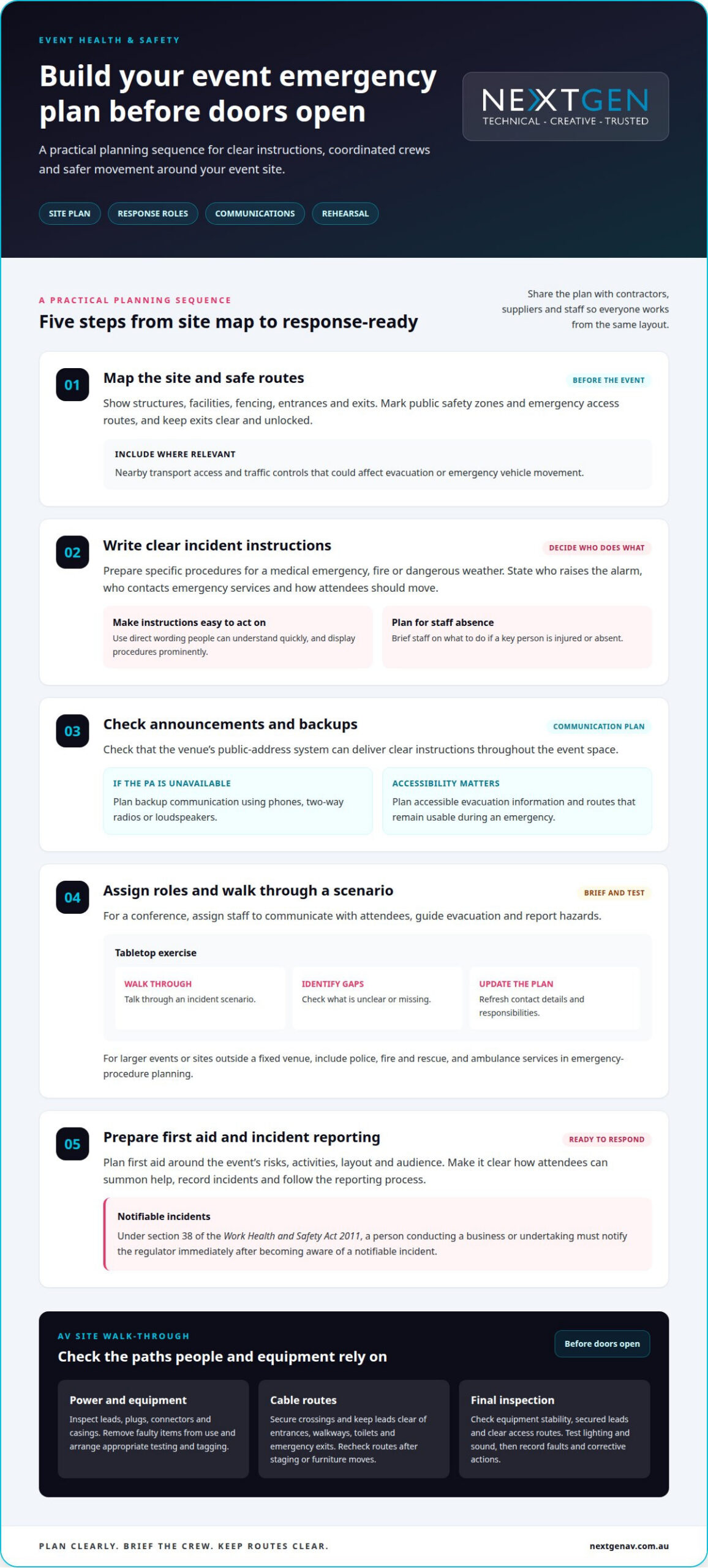
Start with a site plan showing structures, facilities, fencing, entrances and exits. Share it with event contractors, suppliers and staff so everyone works from the same layout. Mark public safety zones and emergency access routes, then keep exits clear and unlocked. Include nearby transport access and traffic controls where they could affect evacuation or emergency vehicle movement.
Write instructions for specific incidents, such as a medical emergency, fire or dangerous weather. State who raises the alarm, who contacts emergency services and how attendees should move. Display procedures prominently, and brief staff on what to do if a key person is injured or absent. Use direct wording that people can understand quickly.
Check that the venue’s public-address system can deliver clear instructions throughout the event space. Prepare a backup communication plan using phones, two-way radios or loudspeakers if the PA is unavailable. What emergency, backup and accessibility provisions should event AV include? Plan clear announcements, alternative communication channels, accessible evacuation information and routes that remain usable during an emergency.
For a conference, assign staff to communicate with attendees, guide evacuation and report hazards. Test the plan with a tabletop exercise: walk through a scenario, identify gaps, then update contact details and responsibilities. For larger events or sites outside a fixed venue, include police, fire and rescue, and ambulance services in emergency-procedure planning.
Plan first aid around the event’s risks, activities, layout and audience, and make it clear how attendees can summon help. Record incidents and follow the reporting process. Under section 38 of the Work Health and Safety Act 2011, a person conducting a business or undertaking must notify the regulator immediately after becoming aware of a notifiable incident. For events with remote or online participants, virtual and hybrid event solutions can help integrate clear audience communications into the production plan.
3. Supplier and AV-company risk assessments and method statements
A supplier risk assessment should connect each AV task with its hazards and controls. For a conference, assess equipment delivery, installation, operation and pack-down separately. A method statement then sets out the work sequence, access arrangements, equipment and crew responsibilities. Organisers should request both documents from suppliers before bump-in. These assessments turn event health and safety AV requirements into practical steps for each production task.
In the ACT, a PCBU is responsible for systematically identifying event hazards, assessing risks and eliminating them. Organisers and AV suppliers should clarify who manages each task and coordinate where responsibilities overlap. A clear event profile helps define the work: describe activities, audience needs, site conditions, vehicles, access routes and the planned technical setup.
For AV setups, assess the actual tasks and site hazards, including electrical work, manual handling, noise, work at height, rigging and public access. Record each control, who is responsible and how the team will check it during delivery. This task-based approach makes event health and safety AV requirements specific to the production and site.
Organisers can turn controls into practical checks with a safety checklist. Before installing a screen, for example, confirm the setup area, access route, equipment position and crew coordination. For suspended equipment, document the structure, rigging method, exclusion area and supervision arrangements. At festivals, assess traffic flow and separate people from vehicle routes.
Keep assessments up to date. A changed stage layout, weather condition or delivery route can introduce new hazards, so review documents when site conditions or work plans change. Assign someone to record updates and brief affected crews. A one-to-five risk scale can help prioritise hazards, but every rating must lead to specific controls.
Before work starts, confirm suppliers understand the controls and reporting process. During setup, supervisors can compare site conditions with the method statement, pause work if conditions change and record corrective actions. This creates a traceable safety process across suppliers and event teams.
4. Temporary structures, power, fire, and weather hazards
Indoor events still need plans for structures, power, fire and clear access routes. Outdoor sites also face changing weather, ground conditions and wind exposure. In Melbourne, assess how these conditions could affect stages, marquees, lighting, screens and nearby workers. The organiser coordinates controls across the site, including safe access for attendees and contractors.
Indoor and outdoor AV requirements differ: outdoor setups face changing weather and ground conditions, while indoor setups must account for venue layouts and exit routes. In either setting, consider how conditions affect equipment stability, access and evacuation, then include relevant controls in the site plan.
For temporary stages, screens, lighting rigs and truss, follow work health and safety requirements and relevant Australian Standards, particularly for working at heights and setting up scaffolding and staging. Applicable requirements depend on the work and structure. Include power distribution and electrical equipment in the same site assessment.
Secure AV cables away from pedestrian routes, doors and emergency exits. Where a crossing cannot be avoided, use suitable cable protection and make the route visible. Trace cables from power sources to equipment during site inspections, then recheck them after staging, lighting or audience layouts change.
Assess fire access, weather exposure, first aid arrangements and security alongside the technical setup. Keep emergency routes accessible when positioning a stage or temporary structure, and brief trained workers on the event’s weather procedures. If conditions affect a structure or equipment, pause the relevant work and follow the agreed control plan.
For temporary stages or suspended equipment, plan staging and rigging around site conditions, equipment loads and safe access requirements.
NextGen AV: Virtual and Hybrid Event Solutions
NextGen AV coordinates technical production for events where audience experience and site safety need to work together. Its Virtual and Hybrid Event Solutions connect in-person and remote audiences, while Professional Audio Systems help deliver clear communication across the room.
For a live setup, LED Video Walls, Lighting Design and Equipment, and Staging and Rigging can be coordinated with the event plan. This connects production requirements to access routes, equipment placement and agreed safety controls, rather than treating each technical element in isolation.
Bring NextGen AV into planning when your event needs coordinated technical direction across its venue, audience and production requirements. Contact NextGen AV to discuss your event.
Build safety into the production plan
Make safety part of the event’s creative brief, not a final approval step. When event health and safety AV requirements shape decisions early, production choices can support clear communication, accessible movement and a controlled site setup. This gives your team room to focus on the audience experience while technical details are coordinated behind the scenes.
NextGen AV can coordinate LED Video Walls, Professional Audio Systems and Lighting Design and Equipment with your event’s production needs. Bring the team into planning when your concept involves complex technical elements or calls for a joined-up approach to the live experience.
Contact NextGen AV about event safety and discuss how to plan your next production with confidence.
Frequently Asked Questions
How To Write An Event Emergency Plan?
Start with the event’s most disruptive scenarios and define the decisions each one triggers. For a keynote, for example, consider what happens if a technical fault pauses the program while attendees remain in the room. Set out how the event can resume, relocate or close, and review those decisions whenever the program or venue changes.
Why should you hire an AV company to ensure your audio-visual equipment is health and safety compliant?
An AV production team can connect technical planning with the event’s run sheet, venue conditions and audience experience. This is useful for complex programs with several presenters, screen changes or tightly timed transitions. A coordinated production plan aligns technical decisions with the event’s overall operation, rather than treating each system as an isolated requirement.
What electrical safety rules apply to event AV equipment in Australia?
For a Melbourne event, set electrical controls in line with applicable Victorian requirements and venue procedures. The electrical plan should identify who controls power distribution, isolation, equipment checks and residual current device protection. This gives crew a clear process for responding to a fault and keeps electrical decisions aligned with the site and production setup.
How should AV cables be managed to prevent trips at events?
Plan cable routes alongside the technical layout, placing connection points to minimise crossings through public areas. Keep signal and power runs organised at equipment positions so crew can identify connections during setup and pack-down. If a layout change creates a new crossing, update the route before the area returns to attendee use.
What safety requirements apply to temporary stages, screens, lighting rigs and truss?
Base the structural plan on the intended configuration, equipment and site conditions. Keep relevant engineering documentation with the event records and ensure it reflects the structure actually installed. If the design or equipment arrangement changes, assess the revised configuration before use. This links structural decisions to the event’s documented safety controls.
What Australian standards apply to event rigging and temporary electrical installations?
Follow relevant Australian Standards for work at heights and setting up scaffolding and staging. For electrical equipment, arrange appropriate testing and tagging, and plan residual current device protection.
Discover Valuable Insights
Unlock Expert Tips and Advice
Our blog is packed with valuable information to help you stay ahead. Whether you’re looking for expert advice, industry trends, or practical tips, you’ll find everything you need. Reach out today to learn more or get in touch with us for personalised support!