For organisers comparing hybrid event production services in Melbourne, 66 company matches were recorded as at 20 September 2026. Production brings the in-room and online audiences together through coordinated camera coverage, audio capture, live switching and streaming, with presenters, slides and audience interaction managed as part of one event.
You already know the event needs to work for people in the venue and those joining remotely. That takes more than a camera and a stream: clear sound, purposeful shots and well-timed transitions help remote attendees follow the programme and feel included.
This guide explains how hybrid production works, what camera coverage and live switching involve, and how to assess Melbourne providers. It also covers how planning, platform choice and technical direction shape a seamless event, helping you make informed decisions.
Key Takeaways
- Use the Melbourne provider landscape to understand the options, including how local teams may support events across Victoria and nearby regional centres.
- Map the run sheet, platform needs and audience interactions early so technical planning supports both the room and remote attendees.
- Learn how camera choices, live switching and graphics can keep online viewers connected to each key moment.
- Explore what an Australian provider directory can reveal about company scale, then identify the production capabilities that suit your event.
How many companies deliver virtual and hybrid events in Melbourne?
A directory recorded 66 company records for Melbourne on September 20, 2026. This count offers a market snapshot, not a measure of each provider’s capabilities. For an event in the CBD, Southbank or Docklands, focus on the production needs behind the listing. Virtual audiences need a clear view, clean audio and ways to participate.
When comparing hybrid event production services in Melbourne, assess camera coverage, live switching, streaming and event management. Then consider how the production team will coordinate presenters, content and audience participation across the venue and virtual platform. Check that the proposed plan fits your run sheet, audience and event objectives.
Platform choice shapes registration and participation. Microsoft Teams, Zoom Webinar, YouTube Live, Vimeo, Custom RTMP, Hopin and Eventbrite are among the listed compatible platforms. Match the platform to your audience size, security needs and interaction requirements. Map registration details to the correct access instructions, then test the attendee journey before event day.
Carry your event branding through from the venue to the virtual screen. Align the stage backdrop, slides and graphics so remote attendees recognise the same event identity. Include these details, speaker names and presentation assets in the production plan. Consistency helps both audiences experience one coherent event.
Live Q&A, polling and moderated virtual chat give remote attendees clear ways to contribute. Assign a moderator to track questions and coordinate them with the presenter or room host. Where speakers need to see prompts or audience feedback, confidence monitors can help them stay connected with people in the venue.
A virtual livestream transmits a programme to online viewers. Hybrid production also serves the in-room audience, so sound, slides, cameras and discussion need to work together. A streamed keynote, for example, needs readable presentation content and clear speaker audio, not just a camera pointed at the stage.
Melbourne providers may plan streaming, camera coverage, audio, live switching, speaker support and recording. Compare these capabilities with your event format and engagement needs. A broadcast-style keynote and an interactive panel call for different production choices.
How Does Hybrid Event Production Work?
Production turns an event format into a coordinated plan for in-room and remote audiences. Every decision, from the run sheet to the recording, shapes what attendees experience.
Planning and Production Partnership
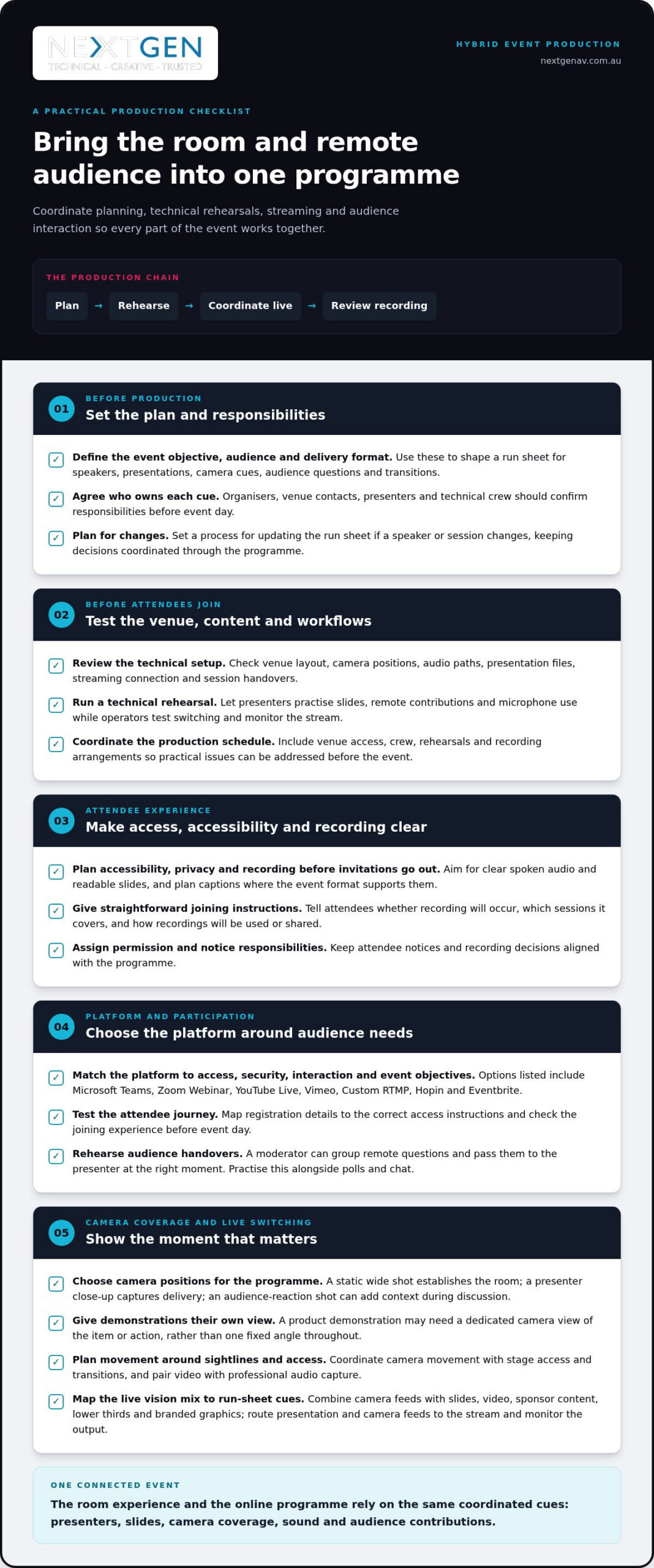
Start with the event objective, audience and delivery format. The production lead can translate these into a run sheet covering speakers, presentations, camera cues, audience questions and transitions. Organisers, venue contacts, presenters and technical crew should agree on responsibilities before event day. Look for clear ownership of each cue and a process for updating the plan when a speaker or session changes. This keeps decisions coordinated throughout the programme.
Pre-production and Technical Rehearsals
Pre-production turns the plan into tested workflows. Review the venue layout, camera positions, audio paths, presentation files, streaming connection and session handovers. During technical rehearsals, presenters can practise slides, remote contributions and microphone use while operators test switching and monitor the stream. A production schedule should coordinate venue access, crew, rehearsals and recording arrangements. These steps reveal practical issues early, leaving time to resolve them before attendees join.
Hybrid Event Requirements
Plan accessibility, privacy and recording before invitations go out. Aim for clear spoken audio and readable slides, and plan captions where the event format supports them. Provide straightforward joining instructions. Tell attendees whether recording will occur, which sessions it covers, and how recordings will be used or shared. Assign an organiser to manage permissions and attendee notices, keeping those decisions aligned with the programme. This sets clear expectations before the event begins.
Streaming Platforms and Audience Interaction
Choose a virtual platform based on attendee access, security, interaction and event objectives. During production, the crew routes presentation and camera feeds to the stream, monitors the output and coordinates audience questions with the room host. A moderator can group remote questions and pass them to the presenter at the right moment. Rehearse this handover, along with polls and chat, so online contributions reach the live programme smoothly.
Camera coverage, live switching and graphics
A hybrid broadcast brings together camera feeds, clear audio and streaming technology. Plan the equipment to serve both the venue audience and remote viewers.
Camera Coverage and Multi-camera Production
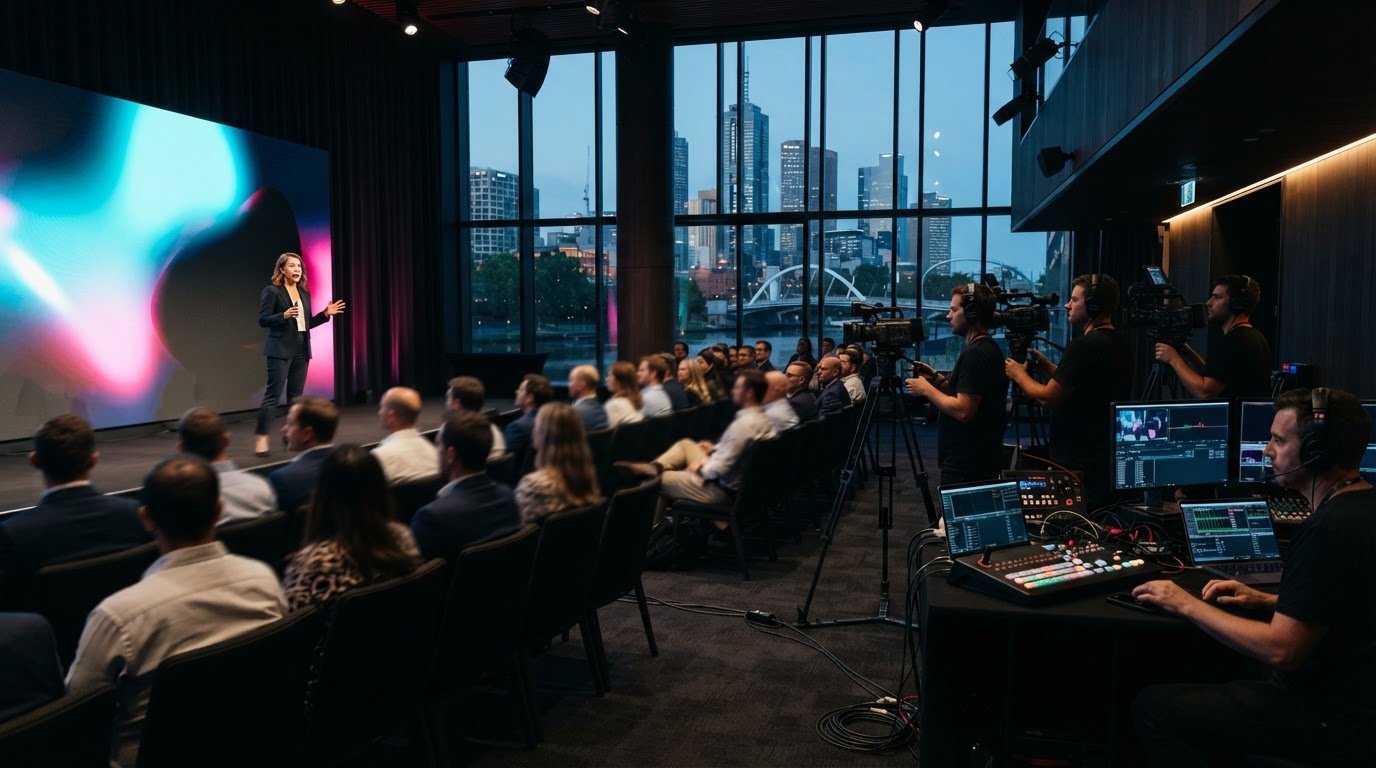
Choose camera positions to suit the programme, not just the stage. A static wide shot establishes the room, while a presenter close-up captures delivery; an audience-reaction shot can add context during discussion. A product demonstration may need a dedicated view of the item or action. The production team coordinates these feeds so online viewers see the relevant moment instead of one fixed angle throughout.
Plan camera movement around speaker sightlines, stage access and transitions. This helps operators capture a panel handover or demonstration without distracting people in the room. Pair video with professional audio capture: distant or unclear speech can make even a well-framed broadcast difficult to follow.
Streaming and Broadcast Technology
Live vision mixing selects and combines camera feeds with slides, video, sponsor content, lower thirds and branded graphics. A video processor can scale content, switch inputs and map signals to LED tiles. The technical plan should show which source appears for each run-sheet cue, such as a speaker introduction followed by presentation slides.
Streaming production also requires signal routing and monitoring. The crew watches the outgoing programme and manages transitions between sources, so viewers see a deliberate sequence rather than setup changes. Lighting should support clear camera images and suit the stage environment; the room’s lighting design and the broadcast image need to work together.
Simultaneous Live Broadcasts
For simultaneous broadcasts, define the feed plan. Identify each destination, the content it receives, and whether viewers need the same graphics, language or interaction. One programme feed can serve audiences watching the same content; separate outputs may be needed when sessions or branding differ. Each choice affects switching, monitoring and crew coordination.
Before going live, rehearse the opening, transitions and any change between destinations. Confirm camera, audio, slide and graphic cues against the run sheet, then monitor each stream during delivery. This keeps the broadcast engaging for remote viewers while the in-room event continues.
Australian hybrid event production company directory
An Australian company list recorded 12 hybrid event production companies with 51-200 employees and one with 501-1,000 employees on September 20, 2026. Its median employee-size band was 1-10 employees. These figures describe the list’s company-size profile, not the quality or suitability of any provider.
For Melbourne organisers, use a directory as a starting point, not a ranking. Check whether a company’s work fits your event format, such as a conference with remote speakers, a product launch or a multi-session programme. Then compare how the production team brings venue operations, streaming and audience participation together in one plan.
Geography can also shape your shortlist. Melbourne had 66 company records, Sydney had 101 company records and Adelaide had 15 company records on September 20, 2026. These are recorded totals, not a measure of market share or service quality. Providers listed for Melbourne may serve Victoria and travel to nearby regional centres, which can matter when an event moves beyond the CBD.
Look beyond headcount. A focused broadcast may suit a smaller crew, while a larger conference can require coordination across sessions, venues and remote contributors. Review each provider’s event types, technical scope and delivery locations. A single-stage keynote and a programme connecting multiple venues, for example, need different production plans.
Build a practical shortlist by matching each provider to your event’s needs:
- Identify whether the event is in-person, virtual and hybrid, or spread across venues.
- Compare relevant experience with conferences, presentations and audience interaction.
- Check how technical planning, live delivery and recording fit together.
- Consider whether the team can coordinate your Melbourne venue and any regional locations.
The useful takeaway: directory numbers reveal the breadth and size profile of Australia’s provider landscape, but your event requirements determine fit. If you’re planning a Melbourne event, discuss your hybrid production requirements with a team that can shape the technical plan around your audience and format.
NextGen AV: LED Video Walls
NextGen AV brings the room and remote audience together through coordinated event production. For a hybrid conference or product launch, LED Video Walls can make presentations and live content visible to attendees on site, while Professional Audio Systems support clear speech across the venue. Lighting Design and Equipment, alongside Staging and Rigging, can shape a cohesive environment around the programme.
Choose NextGen AV when you need these elements planned as part of a coordinated production, rather than treated as separate equipment decisions. The right configuration depends on your venue, content and audience experience. Aligning those details early helps the technology serve the event’s purpose.
Contact NextGen AV to discuss your Melbourne event requirements.
Shape the experience you want
Start by deciding what the online audience should see, hear and take part in. That vision guides practical choices about staging, screen content, sound and lighting, so production supports the message rather than competing with it.
For hybrid event production services in Melbourne, NextGen AV can coordinate LED Video Walls, Professional Audio Systems and Lighting Design and Equipment around your event. Each element can be planned for your content, venue and audience, creating a clear experience for people in the room and those joining remotely.
Bring your event format and key objectives into the conversation, whether you’re planning a conference, launch or corporate presentation. A shared production plan gives creative direction and technical delivery a clear starting point, while keeping the focus on the experience you want attendees to remember.
Start planning your event with NextGen AV, and take the next step towards a polished, connected experience.
Frequently Asked Questions
Which Streaming Platforms Can Be Integrated?
Hybrid event streams can be integrated with platforms such as Microsoft Teams, Zoom Webinar, YouTube Live, Vimeo, Custom RTMP, Hopin and Eventbrite. The right choice depends on your audience’s access, security needs and interaction requirements. For example, a member briefing may need controlled access, while a public product announcement may suit broader viewing. Select the platform around the viewing experience you want to create.
How Can Hybrid Conference AV Improve Audience Engagement?
Hybrid conference AV helps in-room and remote attendees contribute. A moderator can bring online questions into a panel discussion, while a poll invites both audiences to respond to the same prompt. Clear audio and visible presentation content help remote attendees follow the exchange. Plan how virtual contributions will reach the presenter so online attendees feel part of the conversation.
How do you prevent livestream dropouts?
Reduce dropout risk by testing the internet connection, planning dedicated internet and backup options where available, and monitoring the stream during delivery. Include these checks in the technical rehearsal, using the planned equipment and platform at the venue. The crew should monitor the outgoing stream during the event, and the run sheet should identify who responds if connectivity changes.
Which Melbourne companies specialise in hybrid event production?
NextGen AV provides virtual and hybrid event solutions in Melbourne, with technical direction for event production. Its services include streaming and virtual event delivery, supported by technical roles such as camera operators and vision operators. For a Melbourne conference, this can connect the venue programme with remote presenters and attendees. Choose production services that match your event format and audience needs.
What information should I provide to get a hybrid event production quote?
When requesting a quote from NextGen AV, provide your event date, venue, audience size and production requirements. Include the format, session schedule, remote speaker details, preferred viewing platform and whether you need recording. A conference with panel discussions and audience questions, for example, needs a different plan from a single-presenter briefing. These details help shape the quote around the production scope and technical setup.
What are the steps for planning and producing a hybrid event in Melbourne?
Start with a clear brief, then plan around the venue, audience and programme. Coordinate presenters, content, crew and technical testing before the event; during delivery, operators manage the live production. Arrange recording and pack-down as required. For a Melbourne event, share venue access details early so the production team can plan installation and coordinate with venue contacts.
For organisers comparing hybrid event production services in Melbourne, 66 company matches were recorded as at 20 September 2026. Production brings the in-room and online audiences together through coordinated camera coverage, audio capture, live switching and streaming, with presenters, slides and audience interaction managed as part of one event.
You already know the event needs to work for people in the venue and those joining remotely. That takes more than a camera and a stream: clear sound, purposeful shots and well-timed transitions help remote attendees follow the programme and feel included.
This guide explains how hybrid production works, what camera coverage and live switching involve, and how to assess Melbourne providers. It also covers how planning, platform choice and technical direction shape a seamless event, helping you make informed decisions.
Key Takeaways
- Use the Melbourne provider landscape to understand the options, including how local teams may support events across Victoria and nearby regional centres.
- Map the run sheet, platform needs and audience interactions early so technical planning supports both the room and remote attendees.
- Learn how camera choices, live switching and graphics can keep online viewers connected to each key moment.
- Explore what an Australian provider directory can reveal about company scale, then identify the production capabilities that suit your event.
How many companies deliver virtual and hybrid events in Melbourne?
A directory recorded 66 company records for Melbourne on September 20, 2026. This count offers a market snapshot, not a measure of each provider’s capabilities. For an event in the CBD, Southbank or Docklands, focus on the production needs behind the listing. Virtual audiences need a clear view, clean audio and ways to participate.
When comparing hybrid event production services in Melbourne, assess camera coverage, live switching, streaming and event management. Then consider how the production team will coordinate presenters, content and audience participation across the venue and virtual platform. Check that the proposed plan fits your run sheet, audience and event objectives.
Platform choice shapes registration and participation. Microsoft Teams, Zoom Webinar, YouTube Live, Vimeo, Custom RTMP, Hopin and Eventbrite are among the listed compatible platforms. Match the platform to your audience size, security needs and interaction requirements. Map registration details to the correct access instructions, then test the attendee journey before event day.
Carry your event branding through from the venue to the virtual screen. Align the stage backdrop, slides and graphics so remote attendees recognise the same event identity. Include these details, speaker names and presentation assets in the production plan. Consistency helps both audiences experience one coherent event.
Live Q&A, polling and moderated virtual chat give remote attendees clear ways to contribute. Assign a moderator to track questions and coordinate them with the presenter or room host. Where speakers need to see prompts or audience feedback, confidence monitors can help them stay connected with people in the venue.
A virtual livestream transmits a programme to online viewers. Hybrid production also serves the in-room audience, so sound, slides, cameras and discussion need to work together. A streamed keynote, for example, needs readable presentation content and clear speaker audio, not just a camera pointed at the stage.
Melbourne providers may plan streaming, camera coverage, audio, live switching, speaker support and recording. Compare these capabilities with your event format and engagement needs. A broadcast-style keynote and an interactive panel call for different production choices.
How Does Hybrid Event Production Work?
Production turns an event format into a coordinated plan for in-room and remote audiences. Every decision, from the run sheet to the recording, shapes what attendees experience.
Planning and Production Partnership
Start with the event objective, audience and delivery format. The production lead can translate these into a run sheet covering speakers, presentations, camera cues, audience questions and transitions. Organisers, venue contacts, presenters and technical crew should agree on responsibilities before event day. Look for clear ownership of each cue and a process for updating the plan when a speaker or session changes. This keeps decisions coordinated throughout the programme.
Pre-production and Technical Rehearsals
Pre-production turns the plan into tested workflows. Review the venue layout, camera positions, audio paths, presentation files, streaming connection and session handovers. During technical rehearsals, presenters can practise slides, remote contributions and microphone use while operators test switching and monitor the stream. A production schedule should coordinate venue access, crew, rehearsals and recording arrangements. These steps reveal practical issues early, leaving time to resolve them before attendees join.
Hybrid Event Requirements
Plan accessibility, privacy and recording before invitations go out. Aim for clear spoken audio and readable slides, and plan captions where the event format supports them. Provide straightforward joining instructions. Tell attendees whether recording will occur, which sessions it covers, and how recordings will be used or shared. Assign an organiser to manage permissions and attendee notices, keeping those decisions aligned with the programme. This sets clear expectations before the event begins.
Streaming Platforms and Audience Interaction
Choose a virtual platform based on attendee access, security, interaction and event objectives. During production, the crew routes presentation and camera feeds to the stream, monitors the output and coordinates audience questions with the room host. A moderator can group remote questions and pass them to the presenter at the right moment. Rehearse this handover, along with polls and chat, so online contributions reach the live programme smoothly.
Camera coverage, live switching and graphics
A hybrid broadcast brings together camera feeds, clear audio and streaming technology. Plan the equipment to serve both the venue audience and remote viewers.
Camera Coverage and Multi-camera Production
Choose camera positions to suit the programme, not just the stage. A static wide shot establishes the room, while a presenter close-up captures delivery; an audience-reaction shot can add context during discussion. A product demonstration may need a dedicated view of the item or action. The production team coordinates these feeds so online viewers see the relevant moment instead of one fixed angle throughout.
Plan camera movement around speaker sightlines, stage access and transitions. This helps operators capture a panel handover or demonstration without distracting people in the room. Pair video with professional audio capture: distant or unclear speech can make even a well-framed broadcast difficult to follow.
Streaming and Broadcast Technology
Live vision mixing selects and combines camera feeds with slides, video, sponsor content, lower thirds and branded graphics. A video processor can scale content, switch inputs and map signals to LED tiles. The technical plan should show which source appears for each run-sheet cue, such as a speaker introduction followed by presentation slides.
Streaming production also requires signal routing and monitoring. The crew watches the outgoing programme and manages transitions between sources, so viewers see a deliberate sequence rather than setup changes. Lighting should support clear camera images and suit the stage environment; the room’s lighting design and the broadcast image need to work together.
Simultaneous Live Broadcasts
For simultaneous broadcasts, define the feed plan. Identify each destination, the content it receives, and whether viewers need the same graphics, language or interaction. One programme feed can serve audiences watching the same content; separate outputs may be needed when sessions or branding differ. Each choice affects switching, monitoring and crew coordination.
Before going live, rehearse the opening, transitions and any change between destinations. Confirm camera, audio, slide and graphic cues against the run sheet, then monitor each stream during delivery. This keeps the broadcast engaging for remote viewers while the in-room event continues.
Australian hybrid event production company directory
An Australian company list recorded 12 hybrid event production companies with 51-200 employees and one with 501-1,000 employees on September 20, 2026. Its median employee-size band was 1-10 employees. These figures describe the list’s company-size profile, not the quality or suitability of any provider.
For Melbourne organisers, use a directory as a starting point, not a ranking. Check whether a company’s work fits your event format, such as a conference with remote speakers, a product launch or a multi-session programme. Then compare how the production team brings venue operations, streaming and audience participation together in one plan.
Geography can also shape your shortlist. Melbourne had 66 company records, Sydney had 101 company records and Adelaide had 15 company records on September 20, 2026. These are recorded totals, not a measure of market share or service quality. Providers listed for Melbourne may serve Victoria and travel to nearby regional centres, which can matter when an event moves beyond the CBD.
Look beyond headcount. A focused broadcast may suit a smaller crew, while a larger conference can require coordination across sessions, venues and remote contributors. Review each provider’s event types, technical scope and delivery locations. A single-stage keynote and a programme connecting multiple venues, for example, need different production plans.
Build a practical shortlist by matching each provider to your event’s needs:
- Identify whether the event is in-person, virtual and hybrid, or spread across venues.
- Compare relevant experience with conferences, presentations and audience interaction.
- Check how technical planning, live delivery and recording fit together.
- Consider whether the team can coordinate your Melbourne venue and any regional locations.
The useful takeaway: directory numbers reveal the breadth and size profile of Australia’s provider landscape, but your event requirements determine fit. If you’re planning a Melbourne event, discuss your hybrid production requirements with a team that can shape the technical plan around your audience and format.
NextGen AV: LED Video Walls
NextGen AV brings the room and remote audience together through coordinated event production. For a hybrid conference or product launch, LED Video Walls can make presentations and live content visible to attendees on site, while Professional Audio Systems support clear speech across the venue. Lighting Design and Equipment, alongside Staging and Rigging, can shape a cohesive environment around the programme.
Choose NextGen AV when you need these elements planned as part of a coordinated production, rather than treated as separate equipment decisions. The right configuration depends on your venue, content and audience experience. Aligning those details early helps the technology serve the event’s purpose.
Contact NextGen AV to discuss your Melbourne event requirements.
Shape the experience you want
Start by deciding what the online audience should see, hear and take part in. That vision guides practical choices about staging, screen content, sound and lighting, so production supports the message rather than competing with it.
For hybrid event production services in Melbourne, NextGen AV can coordinate LED Video Walls, Professional Audio Systems and Lighting Design and Equipment around your event. Each element can be planned for your content, venue and audience, creating a clear experience for people in the room and those joining remotely.
Bring your event format and key objectives into the conversation, whether you’re planning a conference, launch or corporate presentation. A shared production plan gives creative direction and technical delivery a clear starting point, while keeping the focus on the experience you want attendees to remember.
Start planning your event with NextGen AV, and take the next step towards a polished, connected experience.
Frequently Asked Questions
Which Streaming Platforms Can Be Integrated?
Hybrid event streams can be integrated with platforms such as Microsoft Teams, Zoom Webinar, YouTube Live, Vimeo, Custom RTMP, Hopin and Eventbrite. The right choice depends on your audience’s access, security needs and interaction requirements. For example, a member briefing may need controlled access, while a public product announcement may suit broader viewing. Select the platform around the viewing experience you want to create.
How Can Hybrid Conference AV Improve Audience Engagement?
Hybrid conference AV helps in-room and remote attendees contribute. A moderator can bring online questions into a panel discussion, while a poll invites both audiences to respond to the same prompt. Clear audio and visible presentation content help remote attendees follow the exchange. Plan how virtual contributions will reach the presenter so online attendees feel part of the conversation.
How do you prevent livestream dropouts?
Reduce dropout risk by testing the internet connection, planning dedicated internet and backup options where available, and monitoring the stream during delivery. Include these checks in the technical rehearsal, using the planned equipment and platform at the venue. The crew should monitor the outgoing stream during the event, and the run sheet should identify who responds if connectivity changes.
Which Melbourne companies specialise in hybrid event production?
NextGen AV provides virtual and hybrid event solutions in Melbourne, with technical direction for event production. Its services include streaming and virtual event delivery, supported by technical roles such as camera operators and vision operators. For a Melbourne conference, this can connect the venue programme with remote presenters and attendees. Choose production services that match your event format and audience needs.
What information should I provide to get a hybrid event production quote?
When requesting a quote from NextGen AV, provide your event date, venue, audience size and production requirements. Include the format, session schedule, remote speaker details, preferred viewing platform and whether you need recording. A conference with panel discussions and audience questions, for example, needs a different plan from a single-presenter briefing. These details help shape the quote around the production scope and technical setup.
What are the steps for planning and producing a hybrid event in Melbourne?
Start with a clear brief, then plan around the venue, audience and programme. Coordinate presenters, content, crew and technical testing before the event; during delivery, operators manage the live production. Arrange recording and pack-down as required. For a Melbourne event, share venue access details early so the production team can plan installation and coordinate with venue contacts.
Discover Valuable Insights
Unlock Expert Tips and Advice
Our blog is packed with valuable information to help you stay ahead. Whether you’re looking for expert advice, industry trends, or practical tips, you’ll find everything you need. Reach out today to learn more or get in touch with us for personalised support!