A touchscreen can draw people into an exhibition stand, but dependable technical support helps keep the experience running smoothly. For touch screen hire for exhibitions in Melbourne, on-site support can be included in a professionally managed event setup, with planning and technical direction helping the display work as part of the wider experience.
It’s understandable to want more than a screen delivered to your venue. You need the right display format for your stand, content that works with it, and a capable team coordinating the technical details while you focus on your audience.
This guide covers display options for Melbourne exhibitions and events, how large-format screens can fit into a stand, and what on-site event support involves. It also explains how hire can be tailored to your event, helping you plan an engaging experience while keeping production details coordinated.
Key Takeaways
- On-site technical support can help keep touchscreen experiences running smoothly, from event setup through live operation.
- Display options range from 27 to 75 inches, making screen size a key consideration for your stand layout and audience.
- Plan your exhibition package around the display format, content needs and level of production support required.
- Coordinate screens with staging, lighting and audio to create a cohesive experience that keeps attention on your message.
On-Site Support for Touch Screen Hire in Melbourne?
On-site support brings screen setup, event content and venue arrangements together. For Melbourne exhibitions, technical planning can account for display placement, installation and live event assistance.
Equipment preparation and technical support
Start by matching the display setup to your stand plan and presentation content. The technical team at NextGen AV can check the playback sequence, image orientation and interaction flow before the event, helping avoid preventable interruptions. If a touchscreen sits alongside LED video walls, plan its content and placement as part of the wider visual environment. Clear technical direction helps keep each display aligned with the audience experience.
Delivery, installation and on-site assistance
Coordinate delivery and installation with the exhibition schedule and venue access arrangements. Melbourne venues set their own requirements for screen placement, power access, cable routes and installation, so include these details in the setup plan. On site, technicians position and connect displays, then test playback and touch response. This support can help resolve setup issues before presentations begin and prepare the stand for visitors.
Content and connectivity requirements
For a hired touchscreen, provide the final presentations or media files, the intended interaction flow, and any login or network details required by your content. The technical team can then align the playback plan with the display setup and available connectivity. Include a clear example of the visitor journey, such as opening a product presentation from a welcome screen. This makes it easier to prepare content that feels engaging, reads clearly in bright exhibition spaces and supports a smooth live experience across Melbourne.
Large-format touchscreens
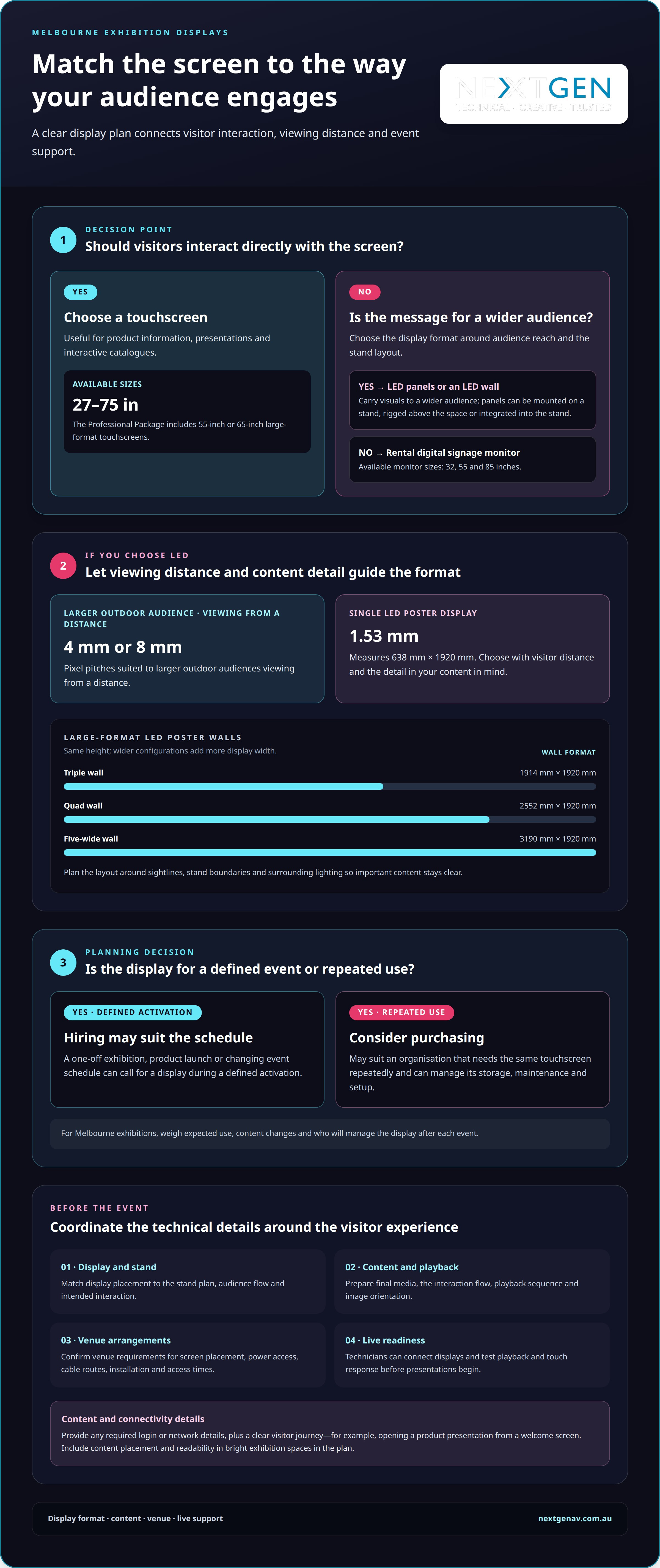
Choose a screen format around the audience’s distance, stand footprint and interaction needs. Rental digital signage monitors include 32-, 55- and 85-inch screens, while the touchscreen range spans 27 to 75 inches. For hands-on product browsing, a touchscreen keeps menus and presentations accessible. For wider viewing, LED panels create a larger digital canvas without requiring every audience member to interact directly.
Large-format LED poster walls can scale across exhibition spaces. A triple wall measures 1914 mm × 1920 mm; a quad measures 2552 mm × 1920 mm; and a five-wide wall measures 3190 mm × 1920 mm. These formats create a continuous visual surface for brand films or product imagery. Plan the panel layout around sightlines, stand boundaries and surrounding lighting, so the content remains clear without cutting across important details.
Viewing distance also shapes LED selection. A 4 mm or 8 mm pixel pitch suits larger outdoor audiences viewing from a distance. By contrast, a single LED poster display measures 638 mm × 1920 mm and has a 1.53 mm pixel pitch. The right format depends on how close visitors will stand and how much detail the content needs to communicate.
For interactive use, a large-format touchscreen is available in 55-inch or 65-inch sizes within the Professional Package. A single display can support a focused presentation, while a broader LED wall can carry supporting visuals around it. Coordinating these surfaces gives visitors a seamless path from stopping to explore to engaging with digital content.
LED panels can be mounted on a stand, rigged above an event space or integrated into an exhibition stand. This flexibility helps match the display to the venue layout and the intended audience experience.
Touch screen rental for exhibitions and events
Interactive displays can attract attention at a Melbourne trade show or corporate event. A well-planned setup connects visitor interaction with the wider event visuals.
Exhibition and event hire options
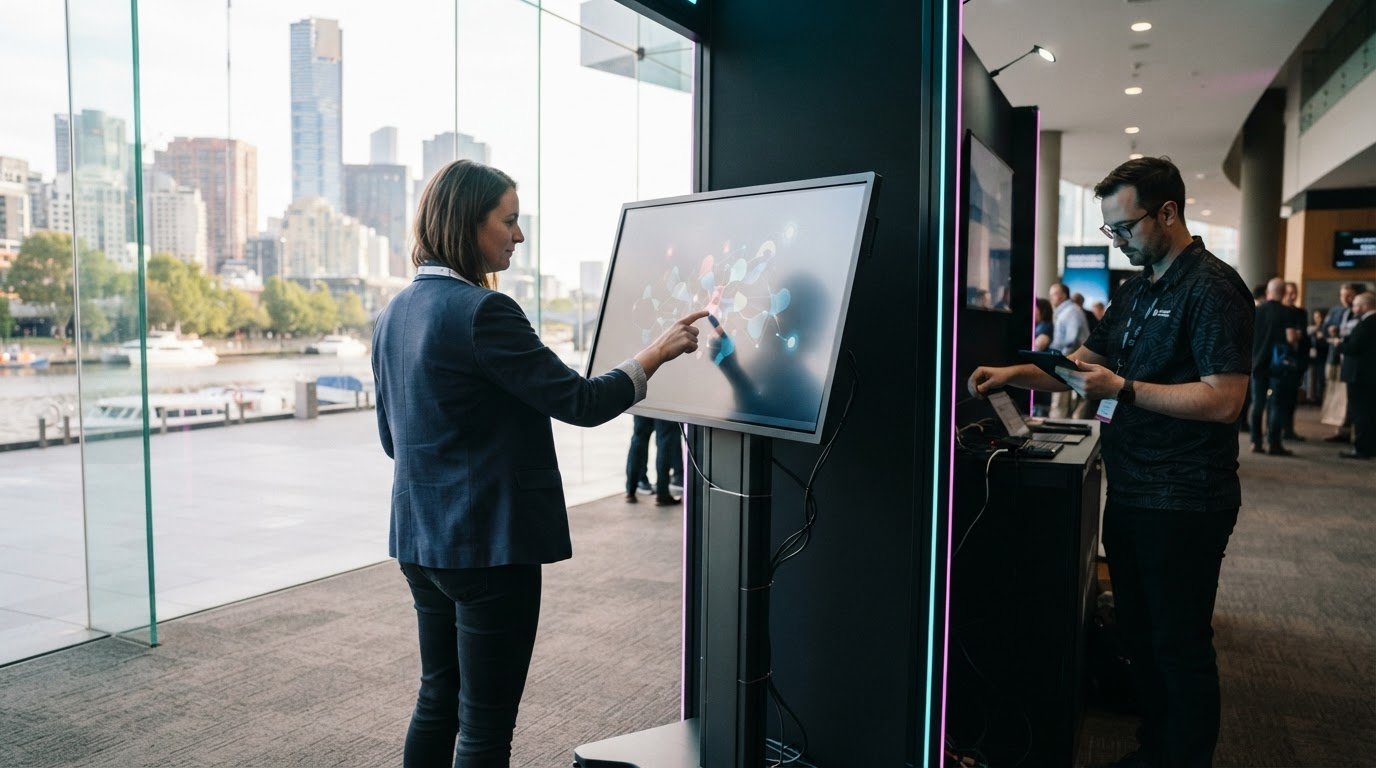
On an exhibition stand, a touchscreen can guide visitors through product information, presentations or an interactive catalogue. At a conference, it could present registration or session information. LED wall hire serves a different purpose: large-format visuals can carry a message to a wider audience. Match each format to the stand layout, visitor flow and content.
Corporate events and trade shows
At a corporate event, a touchscreen can let visitors explore a product demonstration at their own pace. At a trade show, a tailored menu can direct attendees to relevant presentations or product details. Pairing interactive content with an LED wall can extend the message across the stand, without making every display interactive.
Hiring versus purchasing
Hiring suits a one-off exhibition, product launch or changing event schedule, when you need a display for a defined activation rather than between events. Purchasing may suit organisations that need the same touchscreen repeatedly and can manage its storage, maintenance and setup. For Melbourne exhibitors, weigh expected use, content changes and who will manage the display after each event.
Choosing a Melbourne provider
Melbourne providers can differ in whether they supply equipment alone or coordinate technical planning, installation and live event support. Discuss your venue, stand design, content and audience interaction requirements early. Book once your event dates and stand plan are established; preparation needs depend on the display format, venue access and technical complexity. Clear coordination helps organisers align the touchscreen with other event production elements.
Exhibition hire packages
Shape an exhibition package around the event’s purpose, stand footprint and audience journey. For a Melbourne product launch, that might mean an interactive display with coordinated visual content. A conference stand may call for a touchscreen with detailed information alongside an LED wall for broader visibility. Set the scope according to how visitors will engage, not simply the number of screens.
Plan the production elements together: display format, content playback, delivery and installation, and whether the event needs technical support. For an outdoor Melbourne activation, ambient light and viewing distance affect screen visibility, while stand dimensions influence placement. An LED wall can create a strong visual surface, but it should complement rather than compete with the interactive experience.
For an event across Melbourne venues, document the content, venue requirements and setup plan for each location. This helps identify what should remain consistent and what needs to adapt to each space. A polished presentation depends on coordinated content, suitable display placement and a clear technical operation plan. Scoping these elements together helps align production with the event schedule.
Before finalising the package, define the audience interaction, display locations and event timings. For example, a product demonstration might place a touchscreen near the stand entrance, with an LED wall carrying supporting visuals. The technical scope can then follow visitor flow, content format and venue setup. This gives exhibition organisers a practical basis for choosing inclusions that serve the event.
NextGen AV
NextGen AV helps exhibition organisers turn touchscreen requirements into a coordinated production plan. Planning starts with your event objectives, visitor journey and stand design, then aligns technical decisions with how attendees will interact. This keeps the screen connected to the experience you want to create, rather than treating it as an isolated feature.
Share the display’s intended role, the content it will present and how visitors should use it. NextGen AV uses these details to shape a practical technical direction for the exhibition. A stand designed around guided product exploration, for example, needs a different interaction flow from one built around scheduled presentations.
Planning also considers how the touchscreen fits the wider event environment, including sightlines, audience movement and nearby presentations. These details help avoid competing visual moments and create a considered visitor journey. NextGen AV coordinates the production decisions behind the scenes, keeping attention on your message and the people engaging with it.
Bring your event brief, venue details and content plans together to establish a clear direction for your Melbourne exhibition. NextGen AV can help translate those requirements into a tailored production approach, with technical decisions aligned to your objectives. For a considered next step, contact NextGen AV to discuss your exhibition.
Frequently Asked Questions
Can screen sizes be customised for different events?
Yes, display formats can be selected to suit different event layouts, from a focused demonstration point to a larger visual environment. Touchscreens range from 27 to 75 inches, with 55-inch and 65-inch options for a more prominent interaction area. For touch screen hire for exhibitions in Melbourne, the best fit depends on stand space, viewing distance and whether visitors will use the screen individually or alongside a presentation.
What types of touch screens and interactive displays are available to hire in Melbourne?
Melbourne hire options include touchscreen displays in 27-, 32-, 43-, 55-, 65- and 75-inch sizes. Digital signage monitors are available in 32-, 55- and 85-inch formats, alongside LED panels for larger visual surfaces. For example, a team could use an interactive display for product information and a separate screen for broader event messaging, matching each format to its role.
What should a touchscreen hire package include for a Melbourne exhibition?
The hire scope is tailored to each event rather than set as a standard package. It depends on the selected display, hire duration, venue, installation schedule, technical design and level of on-site operation. A clear brief helps shape the equipment and crew around your Melbourne exhibition, including how the display fits within the wider production setup.
Touchscreen hire packages Melbourne: delivery, setup and support
A hire package can include equipment selection, delivery, installation, testing, operation and pack-down, tailored to the venue and event format. On-site technical staff can support setup and live operation, coordinating timing and access as part of production planning. At a conference, this can help align screen use with presentations and other event elements throughout the programme.
Can I hire a touchscreen kiosk or interactive stand for an exhibition in Melbourne?
Yes, an interactive touchscreen can support a kiosk-style visitor experience within an exhibition stand. With touch screen hire for exhibitions in Melbourne, it could be used to browse product details, explore a digital catalogue or view a sequence of presentations. The planned interaction and stand layout help determine the screen format and placement. Include the visitor journey and intended use in your event brief.
Touchscreen hire Melbourne exhibition: screen sizes, specifications and software options
Available touchscreen sizes span 27 to 75 inches. The iiyama 27-inch touch display has a 1920 x 1080 resolution, while larger formats suit different presentation and interaction needs. Software requirements depend on the application and content your event will run. Include the application name, content and intended visitor interaction in the technical brief, so preparation can account for the experience you’re planning.
How far in advance should I book an interactive touchscreen for a Melbourne trade show?
Book once your event dates and stand plan are established. Preparation time depends on the display format, venue access and technical complexity.
Discover Valuable Insights
Unlock Expert Tips and Advice
Our blog is packed with valuable information to help you stay ahead. Whether you’re looking for expert advice, industry trends, or practical tips, you’ll find everything you need. Reach out today to learn more or get in touch with us for personalised support!