Video Switcher Hire for Multi-Camera Event Connections

A multi-camera event can look effortless on screen, but every camera angle depends on a well-planned signal path. Video switcher hire for multi-camera events should match the cameras, displays and live production setup, with capacity for the inputs and outputs the event needs. A reliable camera plan often uses 2-3 matched or similarly behaving cameras, helping the vision switcher move smoothly between shots.

You already know that the right shot can hold attention and bring the room into the moment. The challenge is making every connection work together, from camera feeds and presentation content to the screen or stream receiving the final signal.

This guide explains how camera connections shape the setup, what to consider for different event formats and how input and output capacity affects your options. It also covers control choices to help you plan a polished production and keep the audience focused on the event, not the equipment.

Key Takeaways

  • Plan camera positions and signal paths together so each angle can reach the vision switcher cleanly.
  • A setup with 2-3 matched or similarly behaving cameras can support consistent cuts, with a locked-off wide shot as a safety angle.
  • Map every camera, presentation feed and destination screen before selecting switcher capacity; the event’s signal flow determines the inputs and outputs required.
  • Choose control options around the production’s pace and complexity, then coordinate the switcher with LED Video Walls for a unified audience experience.

Camera and vision-switcher connections

Each camera feed needs a clear route into the vision switcher. For a conference, match each camera output to the switcher’s connections and the production’s display or streaming platform.

Camera-to-switcher connections

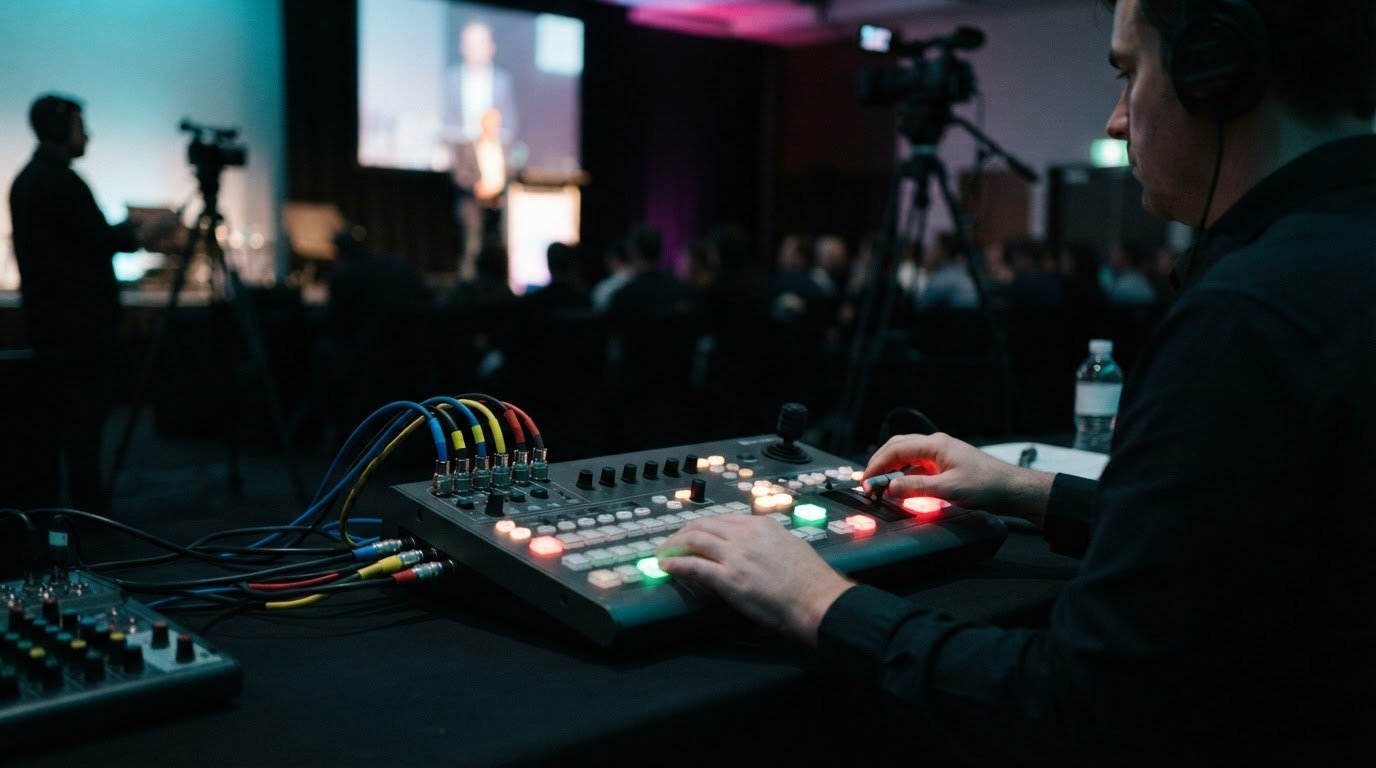
Camera operators frame the action while the vision director selects which feed appears next. Each signal travels from its camera into the switcher, then the selected picture goes to its destination. For example, a lectern camera can provide a steady speaker shot while another operator captures audience reactions. Plan cable routes, camera positions and the required output format in advance.

Should you hire a video switcher with an operator or use a self-operated setup? At a live event with several camera feeds, an operator can manage transitions while camera operators concentrate on framing. A self-operated setup may suit a simpler production with fewer live decisions and a designated person who is confident using the controls.

Vision mixer and switcher hire

“Vision mixer” and “video switcher” describe the equipment used to select and combine video sources. Hire planning covers the switcher, its connection needs and who will operate it. A Barco Encore3 may be considered for a production, but selection should follow the event’s input, output and control requirements, not the model name alone. The vision director coordinates shot changes with the event’s cues.

How should a production team choose between ATEM, Roland and other switchers? Start by mapping cameras, presentation feeds, displays and streaming destinations. Then match those requirements to the system’s connections and controls. The right choice supports the run sheet without adding unnecessary complexity.

The production team coordinates equipment placement, cable routes, power access and signal destinations with the venue. Broadcast or streaming platform requirements also shape the signal path and output plan.

A multi-camera setup may also require camera cables, monitors, a control position and suitable connections to displays or streaming systems.

Book once the camera plan, venue, run sheet and destinations begin to take shape. This gives the production team time to plan connections and coordinate switcher control with the event schedule.

Multi-camera live event setups

A live event setup turns separate camera feeds into a coordinated picture for the room, stream or both. The camera plan, switching cues and audience destinations all shape how the production runs.

Live camera switching

Live camera switching follows the event’s action, moving between a speaker, audience response and presentation content. A reliable setup can use 2-3 matched or similarly behaving cameras, with one locked-off wide camera as a safety shot and one close angle for reactions or lectern details. The vision director cues each transition against the run sheet, keeping the screen and live stream aligned with the programme.

At a conference, camera operators can cover the speaker and audience while the switcher brings slides into the live output. This gives remote viewers a considered sequence instead of a single static view.

Switching risks and backup plans

Live switching risks include a lost camera feed, an unexpected programme change or a missed cue. A locked-off wide shot provides a useful fallback if a close angle becomes unavailable. Rehearsing key transitions and keeping presentation content ready gives the vision director a clear option if the run sheet changes.

Hybrid events add a second audience destination. The team plans the room screen and streaming output together, then checks that each receives the intended picture and content.

Setup, testing and pack-down

Before doors open, the production team positions cameras, routes signals to the switcher and connects the planned screen or stream outputs. Testing covers every camera feed, presentation source, transition and destination. Rehearsing with the event run sheet helps camera operators and the vision director coordinate speaker entrances, slides and planned changes.

During pack-down, the team ends the live output, disconnects equipment and clears the production position. For events that combine in-room presentation with virtual and hybrid event solutions, coordinated testing helps keep the experience consistent for both audiences.
Video Switcher Hire for Multi-Camera Event Connections

Input and output capacity

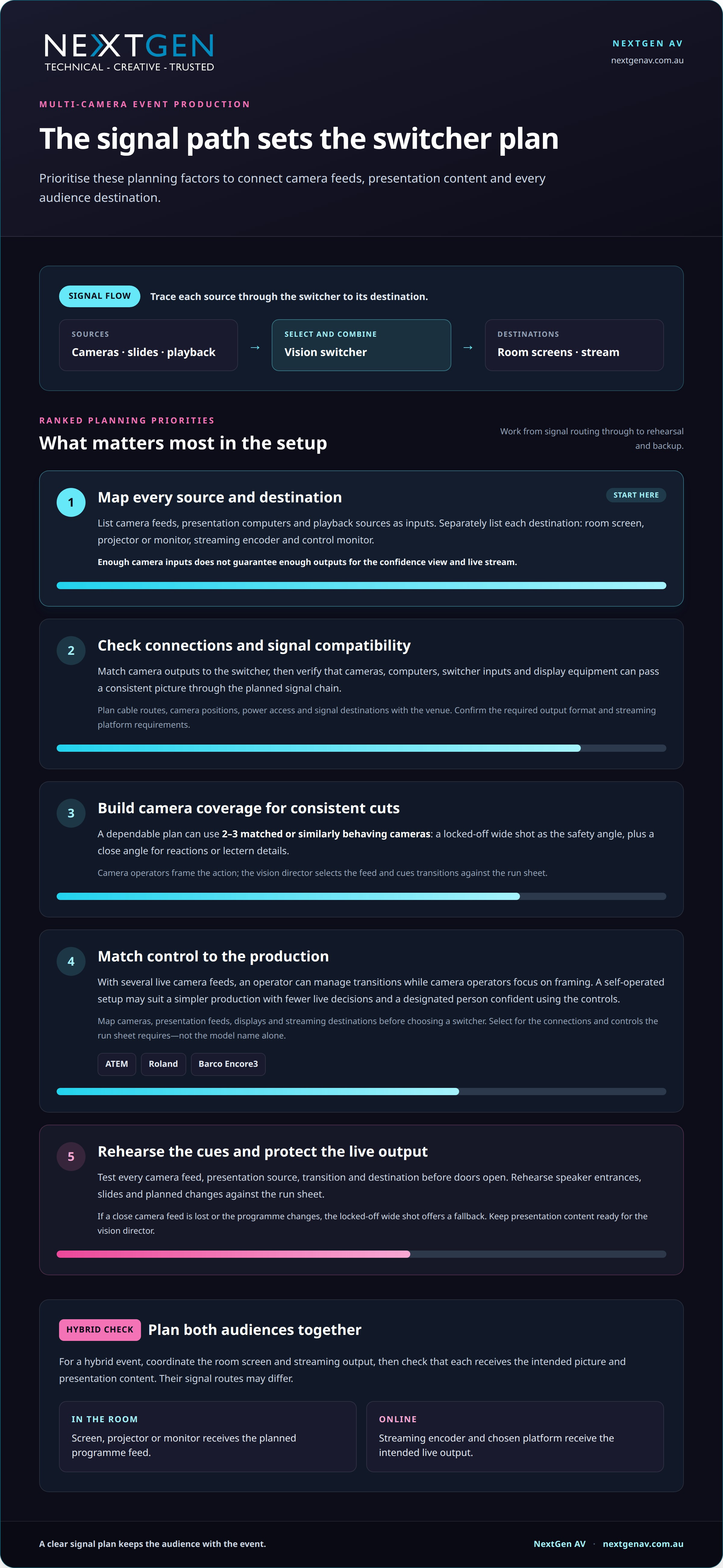
Capacity starts with the signal map: every camera and presentation source needs an input, and each destination needs a suitable output. For a conference, destinations might include a room monitor, main screen and streaming encoder. Planning these routes early helps the switcher serve both the in-person audience and remote viewers.

Count sources and destinations separately. A switcher with enough camera inputs may still lack the outputs needed for a confidence monitor and live stream. Map each feed from source to destination, then select equipment that can route the required signals without disrupting the programme.

  • Inputs: camera feeds, presentation computers and playback sources entering the switcher.
  • Room outputs: the selected programme feed sent to a screen, projector or monitor.
  • Streaming output: the programme feed routed to an encoder and the chosen platform, such as YouTube.
  • Control monitor: a view that lets the vision team check sources and the live programme.

Signal compatibility matters as much as the number of connections. Check that cameras, computers, switcher inputs and display equipment can pass a consistent picture through the planned chain. If a presentation computer feeds the room screen and stream, the route must preserve the intended content for both. A monitor at the control position also helps the operator see what viewers receive.

At a hybrid event, the room screen and streaming output may need different signal routes. Plan those paths alongside presentation changes, speaker shots and playback cues. This reduces last-minute repatching and keeps both audience destinations aligned with the programme.

Before confirming capacity, record every source and destination in a signal plan. This gives the event crew a shared reference for setup, testing and live operation, while allowing planned content changes to run smoothly.

Control options

Control choices shape how the vision team manages sources during a live event. A simple conference may need direct cuts between cameras and slides, while a broadcast with timed graphics may require more coordinated cues. Choose an approach that fits the run sheet, operator roles and required outputs.

A physical control surface gives the operator dedicated buttons and faders to select sources, preview shots and take them live. Software control can suit a compact production position, provided the operator can monitor the interface clearly and respond to cues. For video switcher hire for multi-camera events, match the control method to the event workflow, not just personal preference.

  • Preview and program: check the next source before sending it to the audience.
  • Direct cuts: move cleanly between a speaker camera and presentation feed.
  • Prepared cues: organise planned transitions around speaker entrances, videos and graphics.

For a product launch, the run sheet might call for a presenter, a product close-up and a prepared video. The vision director and switcher operator coordinate those changes while camera operators maintain the required framing. Clear cue names reduce confusion if the live schedule shifts. Plan the switching setup around the cues so the operator can anticipate transitions.

Operator support is valuable when switching requires continuous attention across camera feeds, presentation content and a stream. A self-operated setup may work for a straightforward programme if one person has time to manage the controls alongside other duties. Assign responsibility for every live transition in the production plan.

Before doors open, rehearse key cues and confirm the operator can identify each source. During the event, a dedicated monitor helps the operator see the programme feed and respond to changes. This gives the vision team a clear view of what audiences receive, whether the output is for an in-room screen or a broadcast stream.

For a production that needs coordinated control and technical direction, plan your event’s video switching with a team that can align cues, operators and outputs.

NextGen AV: LED Video Walls

NextGen AV can bring switched camera feeds and event content together on LED Video Walls, giving in-room audiences a clear view of the live production. This suits conferences, product launches and corporate events where camera coverage needs to be prominent across the venue.

For hybrid programmes, Virtual and Hybrid Event Solutions help align the in-room experience with remote participation. Professional Audio Systems and Lighting Design and Equipment can also support productions where sound and stage presentation need to work alongside video.

Share your event format, camera plan and screen requirements with NextGen AV to discuss the production approach. Contact NextGen AV to start planning your event.

Shape the Live Experience

A considered approach to video switcher hire for multi-camera events gives your production a clear path from planning to live delivery. Shape that path around the experience you want people to remember, whether they are watching in the room or joining remotely.

NextGen AV can bring the visual environment together with LED Video Walls, Professional Audio Systems and Lighting Design and Equipment. When these elements are planned as one event experience, camera content, sound and stage presentation can work together rather than compete for attention.

Share your event format, creative direction and audience needs to start shaping a production plan that fits. Contact NextGen AV about your event, and take the next step towards a confident, engaging live experience.

Frequently Asked Questions

What video switchers are available for hire in Australia for multi-camera events?

The right setup depends on the production requirements and equipment selected for the event. For Melbourne events, NextGen AV provides multi-camera live production with live switching, presentation integration and streaming to a nominated platform. The production team matches the switcher to the camera feeds, operator workflow and destinations, rather than choosing by model name alone. This keeps equipment choices grounded in the event plan.

How many camera inputs and outputs do common event video switchers support?

There is no single input or output count that applies to every event switcher. Capacity depends on the selected system and the number of sources and destinations the production needs. Also distinguish physical connections from independent outputs: a duplicated picture may use a different route from a separate screen or stream feed. Map these requirements to the chosen switcher’s documented connections.

How does a production team check video formats, resolutions and connection types before hiring a switcher?

Record the specifications of each source and destination, then check that the complete signal chain is compatible. For example, note whether a camera or presentation computer uses HDMI or SDI, along with its output resolution and frame rate. Check the switcher and display or streaming equipment against those details, then test the signal using the planned sources before the event.

How far in advance should I book a video switcher hire in Australia?

Book once the camera plan, venue, run sheet and destinations begin to take shape. This gives the production team time to plan connections and coordinate switcher control with the schedule.

A multi-camera event can look effortless on screen, but every camera angle depends on a well-planned signal path. Video switcher hire for multi-camera events should match the cameras, displays and live production setup, with capacity for the inputs and outputs the event needs. A reliable camera plan often uses 2-3 matched or similarly behaving cameras, helping the vision switcher move smoothly between shots.

You already know that the right shot can hold attention and bring the room into the moment. The challenge is making every connection work together, from camera feeds and presentation content to the screen or stream receiving the final signal.

This guide explains how camera connections shape the setup, what to consider for different event formats and how input and output capacity affects your options. It also covers control choices to help you plan a polished production and keep the audience focused on the event, not the equipment.

Key Takeaways

  • Plan camera positions and signal paths together so each angle can reach the vision switcher cleanly.
  • A setup with 2-3 matched or similarly behaving cameras can support consistent cuts, with a locked-off wide shot as a safety angle.
  • Map every camera, presentation feed and destination screen before selecting switcher capacity; the event’s signal flow determines the inputs and outputs required.
  • Choose control options around the production’s pace and complexity, then coordinate the switcher with LED Video Walls for a unified audience experience.

Camera and vision-switcher connections

Each camera feed needs a clear route into the vision switcher. For a conference, match each camera output to the switcher’s connections and the production’s display or streaming platform.

Camera-to-switcher connections

Camera operators frame the action while the vision director selects which feed appears next. Each signal travels from its camera into the switcher, then the selected picture goes to its destination. For example, a lectern camera can provide a steady speaker shot while another operator captures audience reactions. Plan cable routes, camera positions and the required output format in advance.

Should you hire a video switcher with an operator or use a self-operated setup? At a live event with several camera feeds, an operator can manage transitions while camera operators concentrate on framing. A self-operated setup may suit a simpler production with fewer live decisions and a designated person who is confident using the controls.

Vision mixer and switcher hire

“Vision mixer” and “video switcher” describe the equipment used to select and combine video sources. Hire planning covers the switcher, its connection needs and who will operate it. A Barco Encore3 may be considered for a production, but selection should follow the event’s input, output and control requirements, not the model name alone. The vision director coordinates shot changes with the event’s cues.

How should a production team choose between ATEM, Roland and other switchers? Start by mapping cameras, presentation feeds, displays and streaming destinations. Then match those requirements to the system’s connections and controls. The right choice supports the run sheet without adding unnecessary complexity.

The production team coordinates equipment placement, cable routes, power access and signal destinations with the venue. Broadcast or streaming platform requirements also shape the signal path and output plan.

A multi-camera setup may also require camera cables, monitors, a control position and suitable connections to displays or streaming systems.

Book once the camera plan, venue, run sheet and destinations begin to take shape. This gives the production team time to plan connections and coordinate switcher control with the event schedule.

Multi-camera live event setups

A live event setup turns separate camera feeds into a coordinated picture for the room, stream or both. The camera plan, switching cues and audience destinations all shape how the production runs.

Live camera switching

Live camera switching follows the event’s action, moving between a speaker, audience response and presentation content. A reliable setup can use 2-3 matched or similarly behaving cameras, with one locked-off wide camera as a safety shot and one close angle for reactions or lectern details. The vision director cues each transition against the run sheet, keeping the screen and live stream aligned with the programme.

At a conference, camera operators can cover the speaker and audience while the switcher brings slides into the live output. This gives remote viewers a considered sequence instead of a single static view.

Switching risks and backup plans

Live switching risks include a lost camera feed, an unexpected programme change or a missed cue. A locked-off wide shot provides a useful fallback if a close angle becomes unavailable. Rehearsing key transitions and keeping presentation content ready gives the vision director a clear option if the run sheet changes.

Hybrid events add a second audience destination. The team plans the room screen and streaming output together, then checks that each receives the intended picture and content.

Setup, testing and pack-down

Before doors open, the production team positions cameras, routes signals to the switcher and connects the planned screen or stream outputs. Testing covers every camera feed, presentation source, transition and destination. Rehearsing with the event run sheet helps camera operators and the vision director coordinate speaker entrances, slides and planned changes.

During pack-down, the team ends the live output, disconnects equipment and clears the production position. For events that combine in-room presentation with virtual and hybrid event solutions, coordinated testing helps keep the experience consistent for both audiences.

Input and output capacity

Capacity starts with the signal map: every camera and presentation source needs an input, and each destination needs a suitable output. For a conference, destinations might include a room monitor, main screen and streaming encoder. Planning these routes early helps the switcher serve both the in-person audience and remote viewers.

Count sources and destinations separately. A switcher with enough camera inputs may still lack the outputs needed for a confidence monitor and live stream. Map each feed from source to destination, then select equipment that can route the required signals without disrupting the programme.

  • Inputs: camera feeds, presentation computers and playback sources entering the switcher.
  • Room outputs: the selected programme feed sent to a screen, projector or monitor.
  • Streaming output: the programme feed routed to an encoder and the chosen platform, such as YouTube.
  • Control monitor: a view that lets the vision team check sources and the live programme.

Signal compatibility matters as much as the number of connections. Check that cameras, computers, switcher inputs and display equipment can pass a consistent picture through the planned chain. If a presentation computer feeds the room screen and stream, the route must preserve the intended content for both. A monitor at the control position also helps the operator see what viewers receive.

At a hybrid event, the room screen and streaming output may need different signal routes. Plan those paths alongside presentation changes, speaker shots and playback cues. This reduces last-minute repatching and keeps both audience destinations aligned with the programme.

Before confirming capacity, record every source and destination in a signal plan. This gives the event crew a shared reference for setup, testing and live operation, while allowing planned content changes to run smoothly.

Control options

Control choices shape how the vision team manages sources during a live event. A simple conference may need direct cuts between cameras and slides, while a broadcast with timed graphics may require more coordinated cues. Choose an approach that fits the run sheet, operator roles and required outputs.

A physical control surface gives the operator dedicated buttons and faders to select sources, preview shots and take them live. Software control can suit a compact production position, provided the operator can monitor the interface clearly and respond to cues. For video switcher hire for multi-camera events, match the control method to the event workflow, not just personal preference.

  • Preview and program: check the next source before sending it to the audience.
  • Direct cuts: move cleanly between a speaker camera and presentation feed.
  • Prepared cues: organise planned transitions around speaker entrances, videos and graphics.

For a product launch, the run sheet might call for a presenter, a product close-up and a prepared video. The vision director and switcher operator coordinate those changes while camera operators maintain the required framing. Clear cue names reduce confusion if the live schedule shifts. Plan the switching setup around the cues so the operator can anticipate transitions.

Operator support is valuable when switching requires continuous attention across camera feeds, presentation content and a stream. A self-operated setup may work for a straightforward programme if one person has time to manage the controls alongside other duties. Assign responsibility for every live transition in the production plan.

Before doors open, rehearse key cues and confirm the operator can identify each source. During the event, a dedicated monitor helps the operator see the programme feed and respond to changes. This gives the vision team a clear view of what audiences receive, whether the output is for an in-room screen or a broadcast stream.

For a production that needs coordinated control and technical direction, plan your event’s video switching with a team that can align cues, operators and outputs.

NextGen AV: LED Video Walls

NextGen AV can bring switched camera feeds and event content together on LED Video Walls, giving in-room audiences a clear view of the live production. This suits conferences, product launches and corporate events where camera coverage needs to be prominent across the venue.

For hybrid programmes, Virtual and Hybrid Event Solutions help align the in-room experience with remote participation. Professional Audio Systems and Lighting Design and Equipment can also support productions where sound and stage presentation need to work alongside video.

Share your event format, camera plan and screen requirements with NextGen AV to discuss the production approach. Contact NextGen AV to start planning your event.

Shape the Live Experience

A considered approach to video switcher hire for multi-camera events gives your production a clear path from planning to live delivery. Shape that path around the experience you want people to remember, whether they are watching in the room or joining remotely.

NextGen AV can bring the visual environment together with LED Video Walls, Professional Audio Systems and Lighting Design and Equipment. When these elements are planned as one event experience, camera content, sound and stage presentation can work together rather than compete for attention.

Share your event format, creative direction and audience needs to start shaping a production plan that fits. Contact NextGen AV about your event, and take the next step towards a confident, engaging live experience.

Frequently Asked Questions

What video switchers are available for hire in Australia for multi-camera events?

The right setup depends on the production requirements and equipment selected for the event. For Melbourne events, NextGen AV provides multi-camera live production with live switching, presentation integration and streaming to a nominated platform. The production team matches the switcher to the camera feeds, operator workflow and destinations, rather than choosing by model name alone. This keeps equipment choices grounded in the event plan.

How many camera inputs and outputs do common event video switchers support?

There is no single input or output count that applies to every event switcher. Capacity depends on the selected system and the number of sources and destinations the production needs. Also distinguish physical connections from independent outputs: a duplicated picture may use a different route from a separate screen or stream feed. Map these requirements to the chosen switcher’s documented connections.

How does a production team check video formats, resolutions and connection types before hiring a switcher?

Record the specifications of each source and destination, then check that the complete signal chain is compatible. For example, note whether a camera or presentation computer uses HDMI or SDI, along with its output resolution and frame rate. Check the switcher and display or streaming equipment against those details, then test the signal using the planned sources before the event.

How far in advance should I book a video switcher hire in Australia?

Book once the camera plan, venue, run sheet and destinations begin to take shape. This gives the production team time to plan connections and coordinate switcher control with the schedule.

Back to Articles

Discover Valuable Insights

Unlock Expert Tips and Advice

Our blog is packed with valuable information to help you stay ahead. Whether you’re looking for expert advice, industry trends, or practical tips, you’ll find everything you need. Reach out today to learn more or get in touch with us for personalised support!

Contact Us

Request A Quote

Make an
Enquiry

Let’s Get Your Event Sorted

Complete the enquiry form with your event date, venue, audience size, event type and budget. Our Melbourne AV team will review your requirements and recommend the right PA, screen, lighting, staging or production setup for your event.

What happens next?


1.We review your event details
Tell us your date, venue, audience size and event type.

2.We recommend the right setup
From PA hire to screens, lighting, staging and full AV production.

3. We come back with clear advice
You’ll receive practical recommendations and a fast quote from our Melbourne team.

Need help urgently?
Call 1300 792 922.

Resource Download

Tell us a bit about yourself to download our resources.

7